Improving performance in the layers panel




The layers panel is the central blueprint of a Figma file. We rearchitected it with new computation and caching strategies, resulting in 30–50% faster interactions in some of the largest, most complex files.
Share Improving performance in the layers panel
Illustrations by Chou Chia Yu
If you’ve used Figma, you are probably familiar with the layers panel, which represents all your design elements in a nested hierarchical list.
The layers panel was originally built nearly seven years ago, when files were smaller and Figma had fewer features. Today, it’s common to see files with tens of thousands of layers. We started to see sluggish interactions with the panel, especially for very large files; layer panel performance could also cause editor operations like dragging or typing to slow down.
To make this core part of our UI fast and smooth again, we rebuilt the layers panel architecture from the ground up.
The previous approach
Figma files are trees of nodes, similar to HTML files. Each node has a set of properties (name, visibility, etc.) and a list of child nodes. To render the layers panel UI, we construct a large JavaScript object containing all the data about each node.
In the original architecture, we would assemble (and, as layers changed, reassemble) this object through a single data-gathering pass. Starting from each top-level node on the current page, we’d gather a bundle of data about the node. Then, if the node was expanded (via the caret icon), we’d recurse into its children, gathering the same data about them, and recursing into their children. On large files with lots of nodes expanded in the panel, this led to substantial slowdowns, as we repeatedly regenerated the data for the layers panel.
Ultimately, this architecture had two primary weaknesses:
- Computing too much: We were computing data for all the expanded nodes, even though only 20–30 rows are actually visible to the user on a typical screen.
- Computing too often: We weren’t doing much caching of incremental computations. Any change to the layers panel (such as expanding a node) essentially required fully recomputing everything from scratch, for every expanded node.
Each of these issues had a distinct fix.
Fix 1: Two-pass computation
To first fix the issue of computing too much, we split our data-gathering phase into two passes.
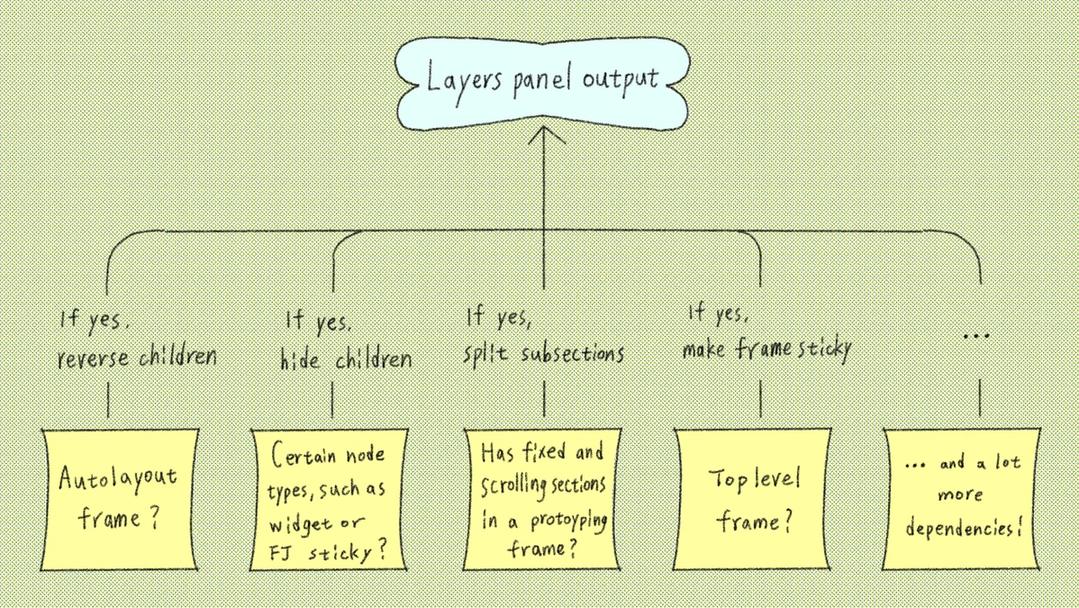
In the first pass, we fetch only the ordered list of row IDs that make up the panel, leaving all other data for later. Note that even this list of IDs is non-trivial to compute. Some of the tricky parts include:
- Children of autolayout frames are displayed in reverse order.
- Certain node types, such as widgets and FigJam stickies, don’t show their children in the panel.
- Fixed/scrolling headers in prototyping frames split children into two subsections.
- Top-level frames and components are sticky.

In the second pass, we compute data for the nodes (names, icons, lock status, visibility, selection state, etc.). Having the IDs from the first pass allows us to only compute data only for the nodes that matter: that is, the nodes that are windowed.
Windowing is a common technique in UI frameworks where only the items in a scrollable list that are visible on screen are rendered. The previous architecture used windowing, but because everything was computed in a single pass, it still gathered the full data for the nodes that aren’t visible on screen and aren’t rendered.
By moving to a two-pass approach, data like names, icons, lock status, visibility, selection state, and so on are now only computed for a few dozen rows, whereas previously they would be computed for potentially hundreds of thousands of rows!
Fix 2: Caching derived data
To fix the second issue of computing too often, we turned to a platform-level primitive we’ve developed over the last couple of years: derived properties.
Each Figma node exposes a set of fields, which work like mutable variables—they can be written to and read from by application code.
However, many properties of nodes are not themselves fields, but are instead computed from fields and from other properties. As an example, consider a node’s absolute position: its offset relative to the (0, 0) point at the center of the canvas. Nodes don’t store this value directly. Instead they store their relative position: their offset from their parent’s position. This makes it easy to move and rotate large trees of nodes all at once.
But how do we compute a node’s absolute position for rendering? We can derive this property via a computation like:
Self.AbsolutePosition = Parent.AbsolutePosition + Self.RelativePosition
The derived properties primitive provides a formal way to declare these properties and keep them up to date automatically, similar to formulas in a spreadsheet that reference other cells. By using the system, you get some nice advantages for free:
- Each derived property knows what fields and derived properties it depends on. This gets compiled into an optimized dependency graph representation.
- There are multiple caching policies, with tradeoffs between speed and memory use.
- Derived properties default to lazy: they’ll only be computed when read from.
The tree structure of the layers panel is a natural fit for derived properties.
Before, we would recalculate node data whenever anything in the tree changed. With derived properties, we can explicitly model the layers-panel structure and the dependencies within it, so that only the relevant subsections of the tree need to update. We can also cache subtree-level panel computations efficiently.
So in the first data pass, where we compute the ordered list of rows, we express things like this (simplified for clarity):
Self.OrderedChildren =
  If(Self.Expanded)
    Children.FlatMap(Child => Child.OrderedChildren)
  Else
    []
A node’s OrderedChildren property would only be invalidated if its expansion state changes, or if the OrderedChildren of any of its children changes.
As an example, imagine a file that looks like this.
We also avoid some computation using the lazy feature of derived properties. For example, OrderedChildren is a lazy property. If a node is never expanded, then its OrderedChildren won’t ever be requested, and therefore not be computed.
Imagine if you expanded Frame B to reveal its children. Under the old system, we’d start at Frame A and recompute everything, including information about all 100 children of Frame C. However, by expressing things as derived properties, only information about Frames A and B need to be computed. As soon as we hit Frame C, we can stop, because we know we can reuse the old value.
Memory usage
Adding caching inevitably increases memory usage. We were comfortable with small increases in memory if they led to improvements in performance. But using too much memory would increase the rate of “out of memory” errors, which are frustrating to encounter.
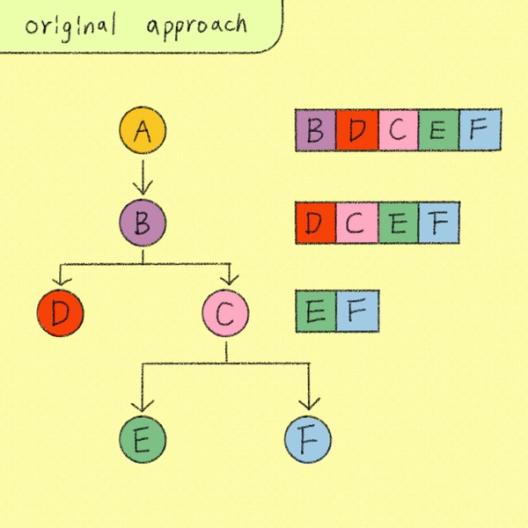
A naive implementation of OrderedChildren caching might look like this:
Frame A: [B, C, D]
  Frame B: [C, D]
    Frame C: [D]
      Frame D: []
The memory cost follows a triangular-number sum. Adding 1 + 2 + … + n gives n(n + 1)/2.
Each level of the tree needs to cache the IDs of all its descendants. This creates a triangular number sum, leading to O(n²) memory usage. In very deep trees, this can be tens of megabytes, which is not acceptable.
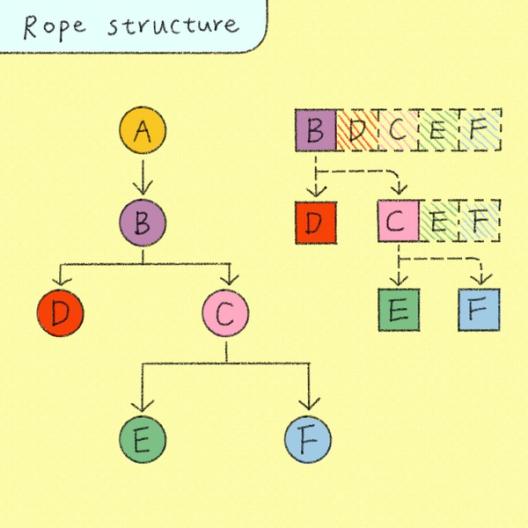
A rope is a tree-like way to store sequences in smaller pieces, so edits and concatenations can reuse existing pieces instead of rebuilding the whole sequence.
Instead, we implemented OrderedChildren caching using a recursive list, similar to a rope data structure. This maximized structural sharing by composing via pointers rather than copying. The memory usage became strictly proportional to the number of unique nodes (O(n)), at the minor cost of additional pointer traversals during reads. This reduced memory usage by up to 99% in comparison to the original prototype.


Performance impact
As a result of this work, we’ve observed drastic performance improvements. Critical layer panel interactions like expanding/collapsing rows or toggling visibility/lock state became nearly 30–50% faster in some of the largest and most complex files.
While the layer panel itself saw the biggest performance gains, the impact extended to the entire Figma design editor. By cutting down unnecessary work, we also improved overall rendering performance, leading to higher FPS and fewer slow frames. As a result, operations that previously felt sluggish—like typing, dragging, and selecting colors in certain complex files—now feel consistently smooth!
We’ve still got a long way to go, and we’re always looking for ways to improve performance across Figma.
We're hiring engineers!
Learn more about life at Figma, and browse our open roles.
Thank you to Eli Fitch, Amy Shan, Russell McClellan, Josh Ferrell, Connor Smith, Elynn Lee, and Alex Triana for their contributions!
Shannen is a software engineer on Figma’s internal design system team, focused on building robust, high quality UI systems and patterns. Previously, she worked on FigJam, contributing to its editor systems.
Peter is a software engineer on Figma’s SceneGraph team, working on core APIs for reading and writing data in Figma’s editor engine.