Botim’s journey to AI-ready design with Figma
Botim, a leading fintech platform in the Middle East that combines communication and financial services for more than 150 million users, was confronted with a common industry issue: an increasing disparity between design and production. Despite having built a robust design system from scratch, the team found that their Figma designs and component libraries were often out of sync, leading to manual, repetitive work and disruption to the development process.
Botim solved this problem by transforming their workflow and integrating Figma Design, Dev Mode, Code Connect and Figma Make into an AI-driven ecosystem. By reducing friction between design and development, the team is able to deliver more intuitive experiences at scale, helping Botim continue to simplify how millions of people connect, and access financial services every day.
Bridging the gap between design and code
For the Botim team, the goal was to move beyond pixel-perfect static screens toward a system where design is reliably interpreted as production-level code. The team reached this goal thanks to:
- The component optimization: the team established a “golden number” of 32 core components to rationalize their UI.
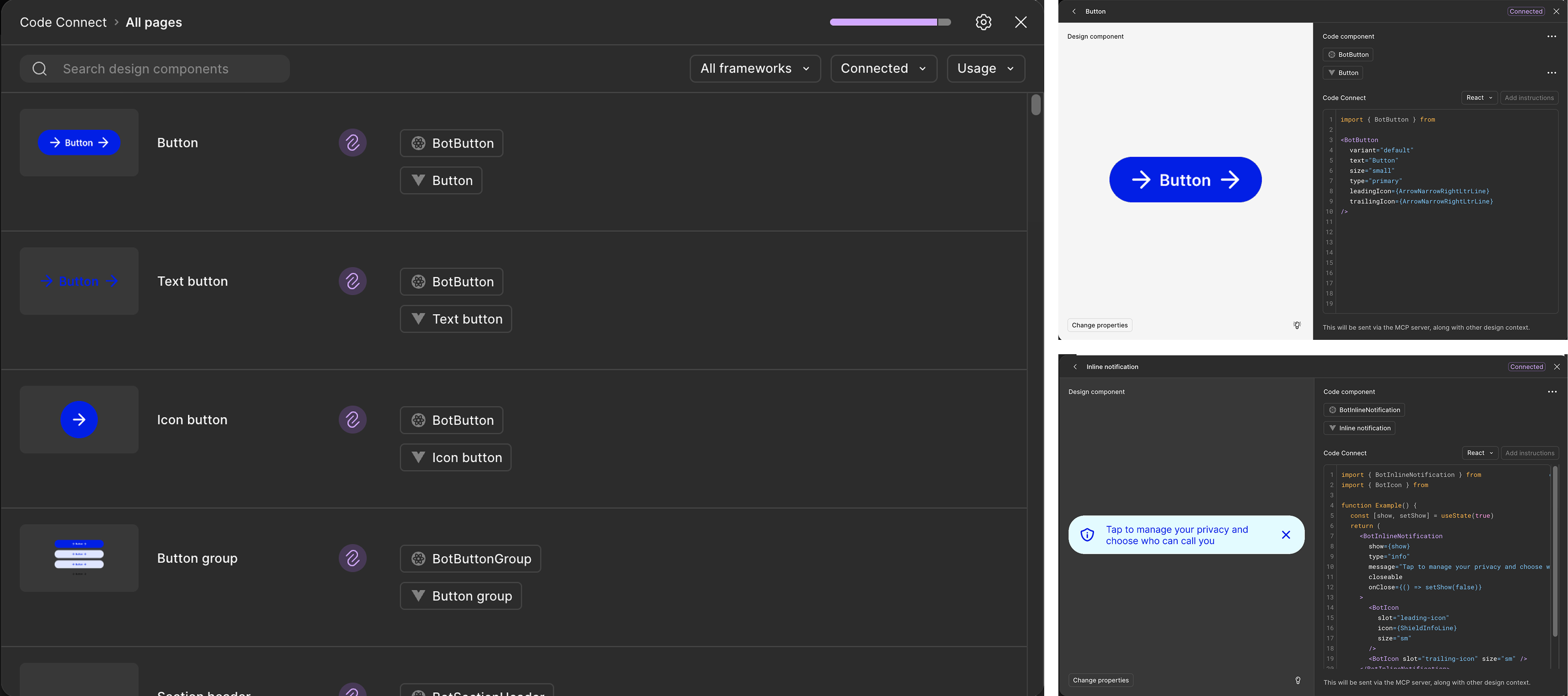
- The 1-to-1 mapping strategy: the team realized that for AI to be effective, there had to be a complete mapping between design components and the codebase. They performed a rigorous cleanup of their Figma files, ensuring that whatever appeared in Figma perfectly matched the components in their library.
- Leveraging Dev Mode: by using Figma’s Dev Tools, Botim connected Figma Design directly to their code. This allowed them to expose signals like themes and properties that are directly readable by the machine.

Building an AI-ready workflow with Figma Make
Botim developed a proprietary AI system that acts as a companion to the design process. Utilising Figma’s advanced features, it automates complex tasks, moving designers away from manually creating pixel-perfect screens and towards a system in which they act as directors for AI assistants:
- Automated design reviews: instead of manual reviews, the team uses a workflow that turns PRDs (Product Requirement Documents) and research findings into markdown files. These files are then fed into their AI system to generate a comprehensive design review document that identifies missing states or features. This feedback was then automatically posted onto the Figma screens thanks to the Figma API, which also generated a Make prompt to help refine the interface.
- Figma Make for rapid prototyping: a key output of Botim’s AI review process is a Figma Make prompt. Designers can copy and paste this prompt into Figma to automatically generate missing solutions, such as loading states or error screens, which are then manually refined.
- Speed and accuracy: this workflow has dramatically reduced development time. In one demo, the team was able to develop five functional screens in approximately 10 minutes.
Scaling consistency and impact
To maintain quality across a massive user base, Botim established strict rules for how Figma tools are used to prevent technical debt:
- The 95% rule: the team is very strict about component usage, requiring that 95% of any screen must be built using existing library components to ensure consistency.
- Platform-agnostic design: the new workflow allows for “two plus designs”, meaning designers no longer have to create separate versions for Android and iOS manually; the system handles platform-specific constraints. Besides, this workflow also included right-to-left text and dark mode.
An AI-first future: from PRD to production
The ultimate ambition is a PRD to production pipeline that achieves 80% workflow automation, where AI agents manage the entire stack from back-end API contracts to front-end UI. In this close future, the role of both designer and developer evolves: designers move from manual pixel-pushing to acting as directors for AI assistants, while developers shift their focus to reviewing and shipping high-quality code rather than building components from scratch. As the team works to bake UX constraints directly into the AI’s logic, they are moving toward a world where the design system is a trusted, self-governing gatekeeper for production.
“The idea is to create a process where I trust the design system, ensuring that what is in the design system is exactly what we see in production,” says Sherizan Sheik, highlighting the goal of a fully synchronized, machine-readable ecosystem.
In Botim’s innovative approach, software design is based on creating AI-ready systems where the line between design and code is blurred in favor of a single source of truth. Using Dev Mode and Code Connect, the team established a comprehensive mapping that connects each Figma component to its technical equivalent in production, enabling AI agents to accurately interpret mockups as structured data rather than mere images. This not only eliminated technical debt but also achieved 90% accuracy in automatic code generation, reducing development cycles to a few minutes instead of several weeks.
Ultimately, this transformation is redefining creative roles: designers and developers are no longer mere executors but have become the strategic directors of intelligent assistants within an automated pipeline spanning from product definition to actual deployment.
Article published on 5 July 2026.
See how Figma can help you scale design
Get in touch to learn more about how Figma can help companies scale design.
See how Figma can help you scale design
Great design has the potential to differentiate your product and brand. But nothing great is made alone. Figma brings product teams together in a fast and more inclusive design workflow.
Get in touch to learn more about how Figma can help companies scale design.
We’ll cover how Figma can help:
- Bring every step of the design process—from ideation, to creation, to building designs—into one place
- Accelerate design workflows with shared company-wide design systems
- Foster inclusivity in the product team process with products that are web-based, accessible, and easy to use