User journey mapping: What it is + how to do it


Share User journey mapping: What it is + how to do it
Explore more from
Team productivity

No matter what you’re working on, the key to both customer satisfaction and business growth is a strong understanding of your users—but gaining that understanding can be challenging. That’s where user journey mapping comes in.
A user journey map helps you uncover pain points, explore touchpoints from the user’s perspective, and learn how to improve your product.
Imagine you’ve just launched a new e-commerce platform. Shoppers fill their carts with products, but they abandon them before checkout. With a user journey map, you can pinpoint where the customer experience is going wrong and, most importantly, how to power more successful checkouts.
Read on to find out:
- What user journey mapping is
- Key components of user journey maps
- The two types of user journey maps and when to use each
- Five steps to creating a user journey map
What is user journey mapping?
User journey maps (or user experience maps) help team members and stakeholders visualize how people interact with your product or website. The goal is to help you flag pain points and churn so your team can design intuitive experiences that meet user needs and expectations efficiently.
User journey map vs. customer journey map

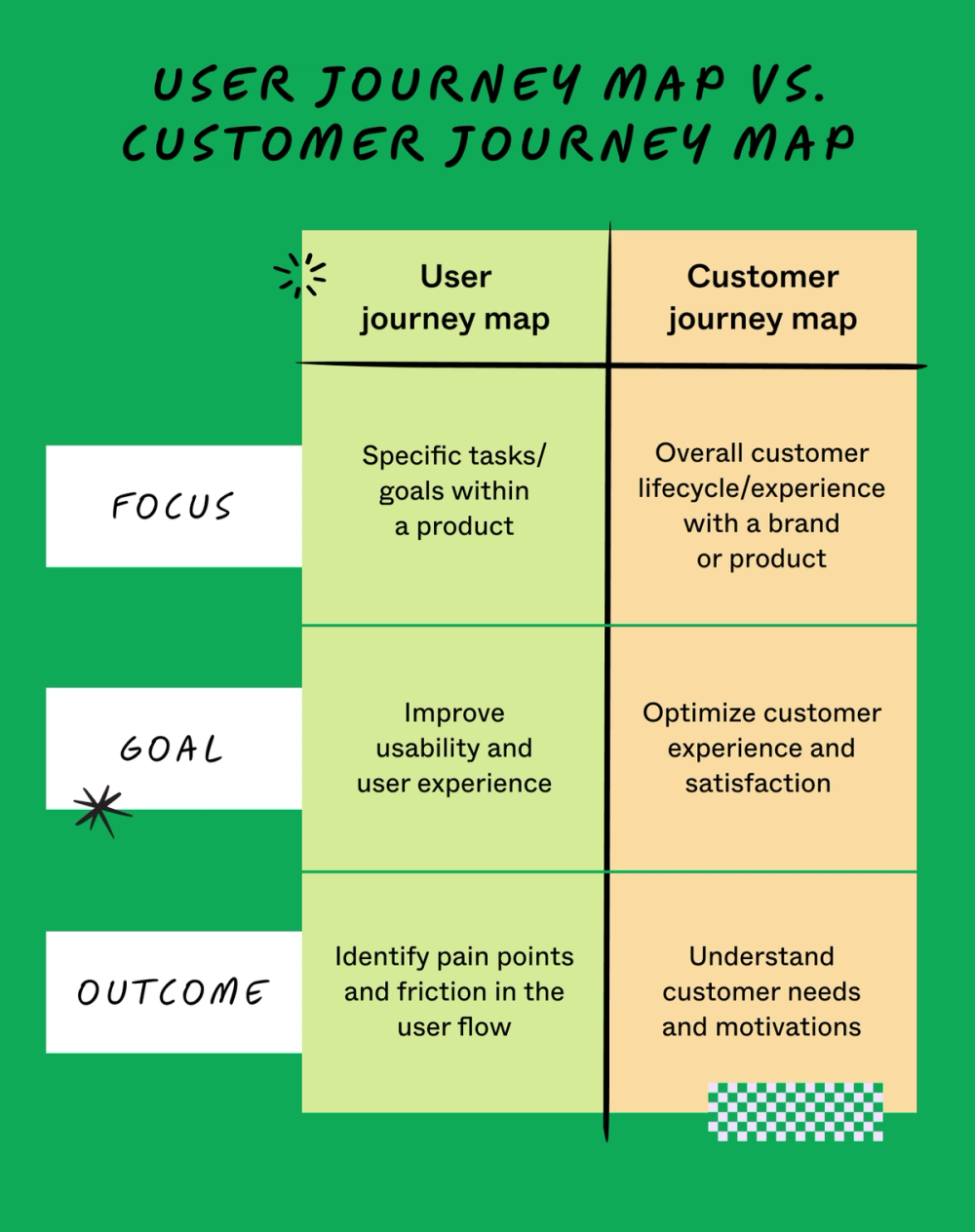
While related, user journey maps and customer journey maps serve different purposes. A user journey map, also called a UX journey map, centers the experience on how a user persona engages with your product’s functionality and interface. It reveals opportunities to improve usability and optimize specific flows.
A customer journey map takes a broader view, tracking the entire customer lifecycle, from awareness through post-purchase. Customer journey maps cover every brand touchpoint across all channels, not just product interactions.
Consider a travel booking app. Designers might create a user journey map to understand how users navigate the app interface to book a flight. The marketing team might create a customer journey map to look at the complete experience: how travelers discover the app, why they chose it, how they interact with support, and what drives their long-term loyalty.
Key components of a user journey map
Before successfully creating a user journey map, you need to be clear on the key elements, each of which has a role in your quest to understand the user.
The user
Start with a clear user persona that captures demographics, goals, motivations, requirements, and challenges. This foundation ensures your map reflects real user perspectives and leads to meaningful improvements.
The scenario and objective
You also need to document the context and purpose behind the user’s interaction with your app or service. Understanding what users want to accomplish—their challenges, desired solutions, and intended outcomes—reveals how your product can best meet their needs.
The journey phases

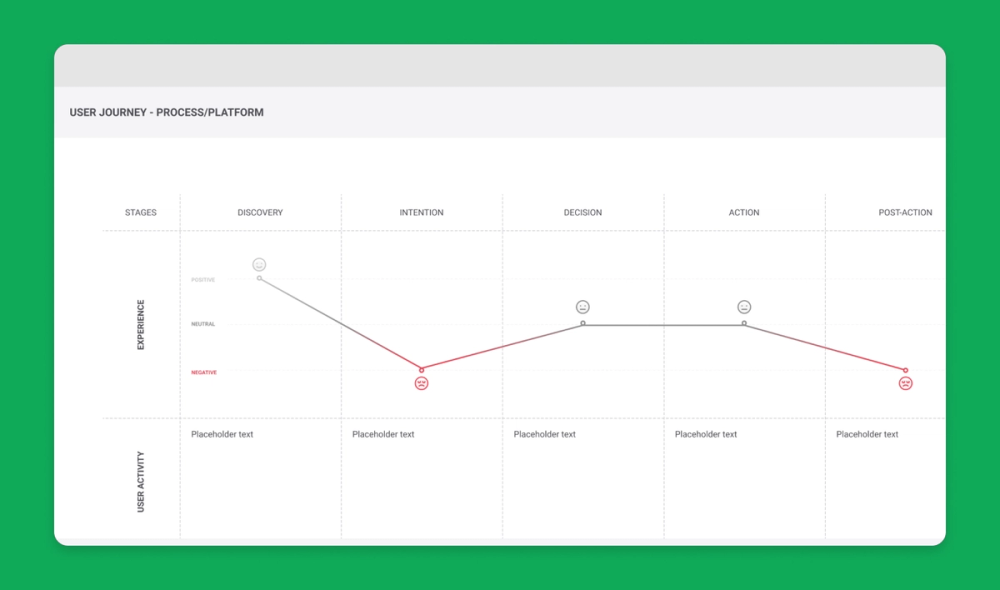
FigJam’s user journey template uses a simple grid to capture the five key stages of the user journey: awareness, consideration, decision, purchase, and retention.
To understand each of the journey phases, consider a practical example. Suppose a new pet parent wants to learn how to train their puppy and comes across your dog training app. Here’s how you might map out the key user journey stages:
- Awareness. The user sees a puppy training video with a link to your product website on social media. They’re intrigued—a positive experience.
- Consideration. The user visits your website to preview the app. If they can’t easily find a video preview or other pertinent information, this could be a neutral or negative experience.
- Decision. The user clicks on a link to the app store, reads your app reviews, and compares it to others. They might think your app reviews are good, but your price is too high—a negative or neutral experience.
- Purchase. The user buys your app and completes the onboarding process. If this process is smooth, it’s a positive experience. If not, the customer experience could turn negative.
- Retention. The user receives follow-up emails featuring premium puppy training services or special offers. Depending on their perception of these emails, the experience can range from good (helpful support) to bad (too much spam).
Actions, attitudes, and emotions
Track user emotions throughout their journey to understand their satisfaction levels and pain points. Document both positive reactions (excitement, satisfaction) and negative ones (frustration, confusion) to build a realistic picture of the user experience.
Opportunities
Use insights from your journey map to identify areas for improvement. Focus on removing obstacles that create friction and enhancing features that drive user engagement. Even strong user experiences often reveal opportunities for refinement.
Two types of user journey maps and when to use them
User journey maps are helpful across the product design and development process, especially at two crucial moments: during product development and for UX troubleshooting. These scenarios call for different user journey maps: current state and future state.
Current-state user journey maps
A current-state user journey map shows existing customer interactions with your product. It gives you a snapshot of what’s happening and pinpoints how to enhance the user experience.
In the puppy training app example, a current-state customer journey map might reveal that users are abandoning their shopping carts before making in-app purchases. Maybe they aren’t convinced it’s a secure checkout or maybe the entire workflow takes too long.
These pain points show where targeted improvements could boost user experience and build customer loyalty.
Future state user journey maps
A future-state user journey map is like a vision board—it shows the ideal customer journey supported by exceptional customer experiences. Sketch out your best guesses about user behavior on an ideal journey, then test them with usability testing. Once you’ve identified your North Star, you can explore new product or site features to optimize the user experience.
How to create a user journey map in five steps
Follow this step-by-step guide to learn how to make a user journey map.
Step 1: Define user personas and goals
Gather user research and data like demographics, psychographics, and shopping behavior, then create detailed customer personas representing your target audience.
Using the puppy training app example, one key demographic may be parents. What’s their goal? It might be “hire a puppy trainer,” but it could be “teach kids how to interact with a puppy” or “learn how to introduce my dog to a new baby.”
Step 2: Identify customer touchpoints
Locate the points along the user journey where the user encounters or interacts with your product.
In the dog training app example, touchpoints might include social media videos, app website, app store category search (e.g., pets), app reviews, app store checkout, in-app onboarding, and app customer support.
Step 3: Visualize journey phases
Start creating your user journey map by organizing your insights into a comprehensive, actionable format. Use user flow diagrams, flowcharts, or storyboards to visually represent the journey phases.
FigJam has several templates to make this part of the process easier. You can share them easily with your team and collaborate to fine-tune your user journey map.
Step 4: Capture user actions and responses
For each stage of the journey, capture the user story—document what they are doing, thinking, and feeling.
Clear observations like: “Users feel frustrated when product images take too long to load” help identify critical moments in the journey.
The puppy training app example shows how small details matter. Users moving from the video preview to app store purchase will either feel satisfied with a smooth transition or give up entirely if they encounter broken links or redirects that land them in the wrong place.
Step 5: Validate and iterate
Finally, show your product to actual users. Get honest feedback about what works and what doesn’t with user testing, website metrics, or surveys.
To use the puppy training app example, you might ask users: Are they interested in subscribing to premium how-to video content from a professional dog trainer?
Apply the user feedback you receive to refine your map and ensure it reflects real customer needs.
Start user journey mapping with FigJam
When you want a strong understanding of your users, their needs, and how to effectively achieve them, it’s time to start the user journey mapping portion of your research and design process. Ready to get started? Figma can help. Here’s how:
- Leverage FigJam’s collaborative online whiteboard to create user journey maps.
- Discover community-created user journey templates and examples to inspire your own design.
- Present your discoveries to stakeholders and teammates with Figma Slides, leveraging drag-and-drop design elements.
Ready to design your user journey map?