Make design sprints more co-creative
This is the final part of our three part series. Check out part 1, which looks at ways to unlock creativity for remote teams, and part 2, which explores how to get better feedback in brainstorming sessions.
Design sprints are typically five-day sessions of conceptualising, building, and testing that quickly turn abstract problems into testable solutions.
If you’ve ever attended a design sprint in person, you know how energising they can be. Getting so many bright minds focused on a single challenge is one of the most fun parts of building a product.
But when we all went remote, sprints took on a different vibe. It didn’t feel as much like working together as just working at the same time. We were all dealing with our own distractions. And we were often working from separate files instead of co-working on a common platform.
Co-creation is important for collaboration. So, we dug into where remote sprints foster co-creation naturally, where they make it harder, and how facilitators can get everyone working from the same space.
Benefits and challenges of a remote design sprint
It takes a lot of cooperation to make a design sprint work, so there are some unique challenges to running them remotely. But once you remove the constraints of the physical location, you’ll find that virtual sprints offer flexibility that in-person sessions can’t match.
👍 More flexibility
There’s no travel planning for remote design sprints. This means you can include more people from a more diverse set of backgrounds without added cost or complexity—including the subjects of your lightning talks.
Remote sprints also give you the freedom to schedule activities offline and on odd days. Run a sprint Wednesday through Tuesday if you want; no one will have to book a weekend stay. And with some activities offline, navigating time zones is a cinch.
👎 New tools to learn
Everyone knows how to write on a sticky note. But not everyone is familiar with digital whiteboards and other online collaboration tools. This becomes exponentially more apparent when you have visual designers, analytical engineers, and non-technical account executives on the team. You’ll need to make sure everyone has access to, and a basic understanding of, the tools you use.
👍 The eternal sprint room
When you run an in-person sprint, you eventually have to clean out the conference room for the next users. Not so when you go remote. All the stickies, designs, and other artefacts—plus the context around them—are saved and ready for future iteration. That’ll give even more time for everyone to work from the same set of assets.
👎 More potential distractions
Kids, pets, and the neighbour’s lawn mower can all interrupt the creative flow. It’s important to help everyone navigate those distractions by planning frequent breaks and offering offline work time.
Tips for leading a remote design sprint
It’s not easy to recreate the collaborative atmosphere from an in-person sprint in a Zoom room.
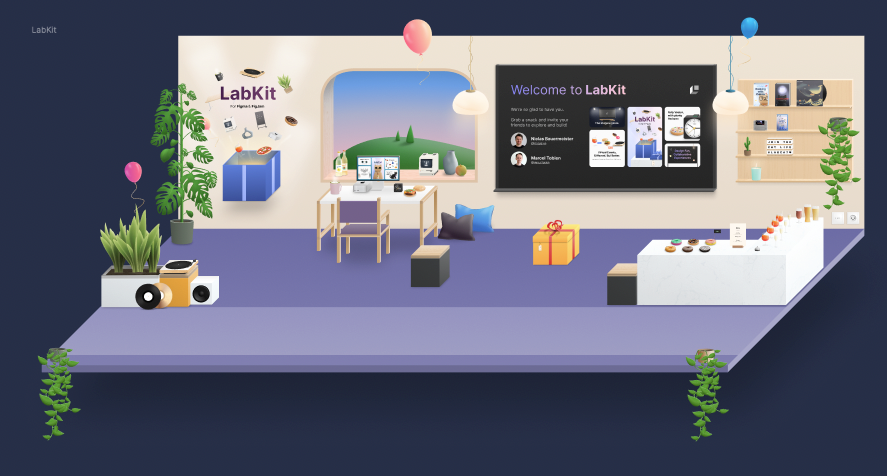
At Config 2022, two designers from MHP - A Porsche Company - showed how they tackled the challenge. Marcel Tobien and Niclas Bauermeister built a digital workshop in FigJam. The online space was modelled after an existing office and came complete with couches, whiteboards, and a welcome room. The duo added games and activities, plus a coffee break area to get everyone engaged and chatting.

You may not have the bandwidth to build your own pixelated sprint room. But there are ways you can make it easier for your team to co-create when working remotely.
Create an agenda: The more complete you can make your agenda, the better. It should account for time zones, show when activities are async, and have slots for dealing with roadblocks.
Also, designate breaks for physical movement, camera-off time, and phone checks so your team doesn’t feel like they need to multitask. And make sure that roles are clearly defined so everyone knows who will lead, who will field tech questions, and so on.
Build a workspace: The more complete your workspace is before the sprint, the faster you can get to sprinting during the session. Spotify’s all-inclusive template is a good shortcut to creating one. It has an agenda, insights artefacts, lightning talk slides, and a lot more.
Run a mini sprint in advance: Sprint time is precious. You don’t want to spend your first hours getting people signed up and familiar with the tools. If you can, run a mini sprint the week prior. Give your team a fun task that requires them to use each piece of tech. That’ll shake out all the log-in issues and tech questions ahead of time.
Send lunch delivery gift cards: You can’t have a plate of sandwiches ready for your sprint team when they’re hundreds of miles away. But you can spring for food delivery to take one personal task off their plate.
Pick a music playlist for creative sessions: We’ve already talked about the importance of music during creative collaboration sessions. Since sprints have several types of mini-sessions, you could play a range of music to match—something energetic for ideation and something meditative for design time.
2. Run the sprint
Overcommunicate: There aren’t as many social cues in remote collaborations to tell you when a session is ending or when someone is struggling during a heads-down sketch activity. Overcommunication—like announcing every restart time on Slack—will help.
Kick off each session with an icebreaker: We’re beating the ritual drum because they’re so important for team cohesion and creativity. The design team at Stripe starts their sprint sessions with a twist on the doodle. Everyone in the group sketches their morning coffee order. We love this idea because it’s approachable, so non-designers can do it.
Create a “treasure trove” of links: Another smart Stripe strategy is to create a spot in their workspace for links to all the docs, briefs, and decks that get referenced during the sprint. The “treasure trove,” as they call it, becomes a swipe file everyone can return to throughout and after the sprint.
Make the creative parts async: Zoom calls are great for productivity but sometimes worse for creativity. Try taking sketch and design iteration exercises offline. Then pool, vote, and comment in a synched co-creation session.
3. Post-session
Save all the context: It’s the journey, not just the destination. All those discussions, divergent thoughts, and even disagreements are gold for future ideation and iteration. Save them in your sprint file and dust them off when it’s time to brainstorm again.
Send structured shareouts: People outside of your sprint team will need to see your work. And you’ll want feedback from others. Spotify created a structured, post-sprint shareout that gives a wide audience space to reflect on their sprints. Here’s how they break it down:
- Guided review of sprint activities and prototype with various stakeholder teams (1 hour each)
- Open access to Figma prototype for comments (3–4 days)
- Design team “office hour” to field any further questions and discussion from the tribe (1 hour)
Hold a sprint retrospective: Remote sprints are new to most product teams. A retrospective of the process will help surface the shiniest parts and those that could use a little polish. Consider holding these both as a real-time meeting and an async activity to get the most feedback. Here’s a retro template to get you started.
Remote design sprint templates
There are plenty of design sprint workspace templates available. Here are a few that we found to be really useful.
Spotify: A comprehensive template for a classic sprint done virtually.
Ironclad: A template that focuses on small group breakouts and independent work, especially for a remote team.

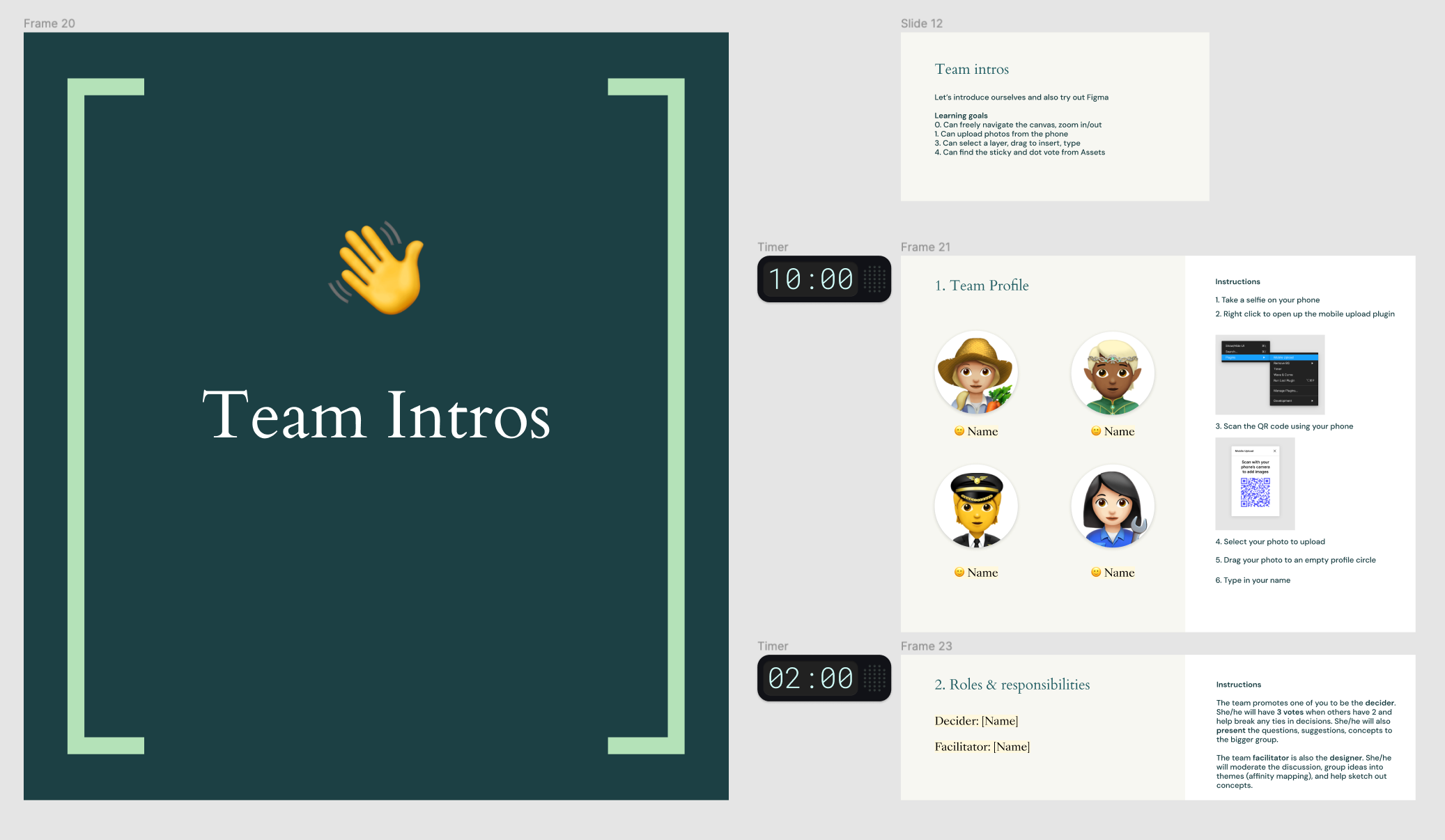
LB Studio: A four-day remote-team sprint template that includes an icebreaker and built-in timers.

Build rapport with online meetings
A modern design team is made of passionate people with varying backgrounds that see a project through a specific lens. Engineers need to know that a new design won’t break what they’ve built for the last three years. Designers want a functional outcome that exceeds user expectations. And project managers need to get activities moving through the next stage.
Design becomes more cohesive when people get to know each other beyond their roles at work. It’s how empathy replaces stubbornness, and confrontation becomes collaboration.
Going remote, we lost the unscripted chances to chat with teammates. There’s no more watercooler—which may have actually been a break room, conference room, or nearby coffee shop—to gather around. We’re usually talking to someone for the first time on day one of a sprint.
We still meet for daily standups and to critique concepts, though. There’s an opportunity to add a layer of rapport building to these regular gatherings.
Tips for running remote standups, crits, and retrospectives
We’ve had a front seat to watch some of the best creative teams, run fun, collaborative meetings that get people interacting.
Here’s a round-up of ways these pros lead three common types of design team meetings.
Daily/weekly standup
Standup meetings are fast-paced peeks at individual productivity. During a standup, each team member answers three questions.
- What did you do yesterday?
- What are you doing today?
- What are your blockers?
Our project managers use a whiteboard template like this one to make standups more visual. It has a frame for each question and pre-made Post-its for each team member.
Standups are also the perfect place for a bit of quick team building through ritual. We like our “weekend highlights” question for a low-lift way to get your remote creative team—who may rarely see each other in person—to open up before getting down to business.
These meetings are meant to be short and sweet, but they’ll inevitably kick up other conversations (a mark of an engaged team). Consider adding a parking lot in your template for offline discussions like this one.
Have people in different time zones? No problem. Just ask everyone to record a Loom video and stitch it together for the team to view.
How great is it that when you go digital, each standup is automatically saved for future reflection? You can jump in anytime and see the micro progress on macro projects.
Design crits
Design crits are a chance to elevate collaboration between talented peers. Team members get feedback from each other by reviewing designs and workflows. They’re great for unblocking, maintaining consistency, and kicking off new designs.
Our Chief Product Officer, Yuhki Yamashita, recently explained a common format for crits at Figma:
- ~10–15 minutes of presenting
- ~5 minutes of lingering questions
- ~5 minutes of silent writing and commenting on the file
He explained how we use Spotlight in FigJam to make co-creating easier. Attendees can comment on the design while someone is presenting. This format gives attendees “multiple points of entry” for maximum feedback.
The team at Overflow created a design crit meeting guide based on their own trials and experiences. There are several great action items for both presenters and attendees.
You can also use crits to build rapport with people from outside the typical design team. We often invite observers from across the company to attend so they get a peek behind the curtain at how our products are made. We get a lot of new feedback, and they learn how new products fit into the work they do.
Design crits are an important ritual in the building process, and failures in them are less obvious when running them online. So, it’s a good idea to run a “crit crit” occasionally to make sure you’re getting useful feedback.
Design retrospective
Retrospectives are a time to reflect on the design sprint process, the problems you’re trying to solve, and the solutions you’ve used to solve them.
The foundation of design retrospectives is built on three questions:
- What should we continue doing?
- What should we stop doing?
- What should we start doing?
To get started with remote restros, create a workspace with sections (or frames in Figma-speak) for each of the questions. Add colored sticky notes for people to add comments and encourage using “+1” for votes. This template will get you started.
Add a timer to your board to keep things moving along, and use emojis to give a wider range of feedback than a simple +1. Have the team co-work to cluster ideas and pain points by theme or root cause.
Leave the workspace open after the meeting to gather feedback after they’ve had their “aha” moments. Then, schedule a follow-up meeting to present the winners and explain next steps. You can also do this async with a Loom video, too.
You can gamify retros to build rapport before and during the meetings. For example, have everyone describe the sprint with a movie or show title, a superhero, or a car brand. If it’s a Chevy “Nova” (Spanish for “no go”), you might have some work to do. Or have them write a “letter to the future” where they foresee what future sprints look like.
Monotony is the enemy of creativity. Shake up your retrospectives by trying different formats.
The 4L retrospective, for example, uses four columns—liked, learned, lacked, longed for—to gather both positive and negative feedback.
This “stop/start/continue” retrospective template has a fun weather theme.
The “sailboat” retrospective is a way to visualise a recent design sprint. Four symbols stand for elements of the sprint.
- Island: objective
- Rocks: risks
- Anchor: impediments
- Wind: propellants
Set up sticky notes with names or colour codes and have the team fill them out for each category.


Ship, test, iterate: Remote collaborations are a WIP
In the words of Figma CPO Yuhki Yamashita, “Today, every digital product is a work in progress. And this has changed how we design. Our work never feels done because it isn’t. … It’s the chaotic reality of modern product design and development.”
As product builders, “ship, test, and iterate” is in our DNA. The same principles apply to facilitating remote collaboration. Not every version will work. Some will work for a while but then become less useful as your team and goals evolve.
The important thing to remember is that you’re not alone in your remote collaboration journey. Hundreds of creatives and facilitators have built and tested templates you can use to make co-creating more inclusive and iterative. Templates for wireframes, product development roadmaps, and, of course, meetings and sprints are all available for you to peruse, pluck, and practise. And once you’ve tweaked your own version to perfection, you can post it for others to learn from, too.
This is the final part of our three part series. Check out part 1, which looks at ways to unlock creativity for remote teams, and part 2, which explores how to get better feedback in brainstorming sessions.
See more
And for further information about how organisations are building a collaborative design process, check out our series of case studies and webinars below.

How Vodafone gets into market more quickly with Figma & FigJam

How Qonto reduces lead times and brings PDE teams together

Recreating the buzz of an in-person workshop, using Figma & FigJam

How N26 makes banking more approachable with Figma

How redefining the "designer" helps you scale