
AI in design: Transforming the way we create
Curious how AI in design is changing the way teams work? See how tools like Figma make it easier to bring ideas to life with real-world examples.
Skip to main content
Building with AI

Most designers have some version of the same story. You ask Claude to explore a layout direction or review some UI copy, and what comes back is technically fine but completely disconnected from your product. It doesn't know your grid, your component library, or who your users are. Claude Skills for design fix that by giving AI a persistent brief it carries into every conversation.
According to Figma’s State of the Designer 2026, 54% of designers say using AI in the design process is now the most in-demand skill in the field. But adoption is the easy part. The harder shift is learning to configure AI to work from your context. Whether you’re a product designer, PM, UI engineer, or builder making design decisions, skills mean Claude arrives at every session already knowing the rules of your system.
Read on to learn:

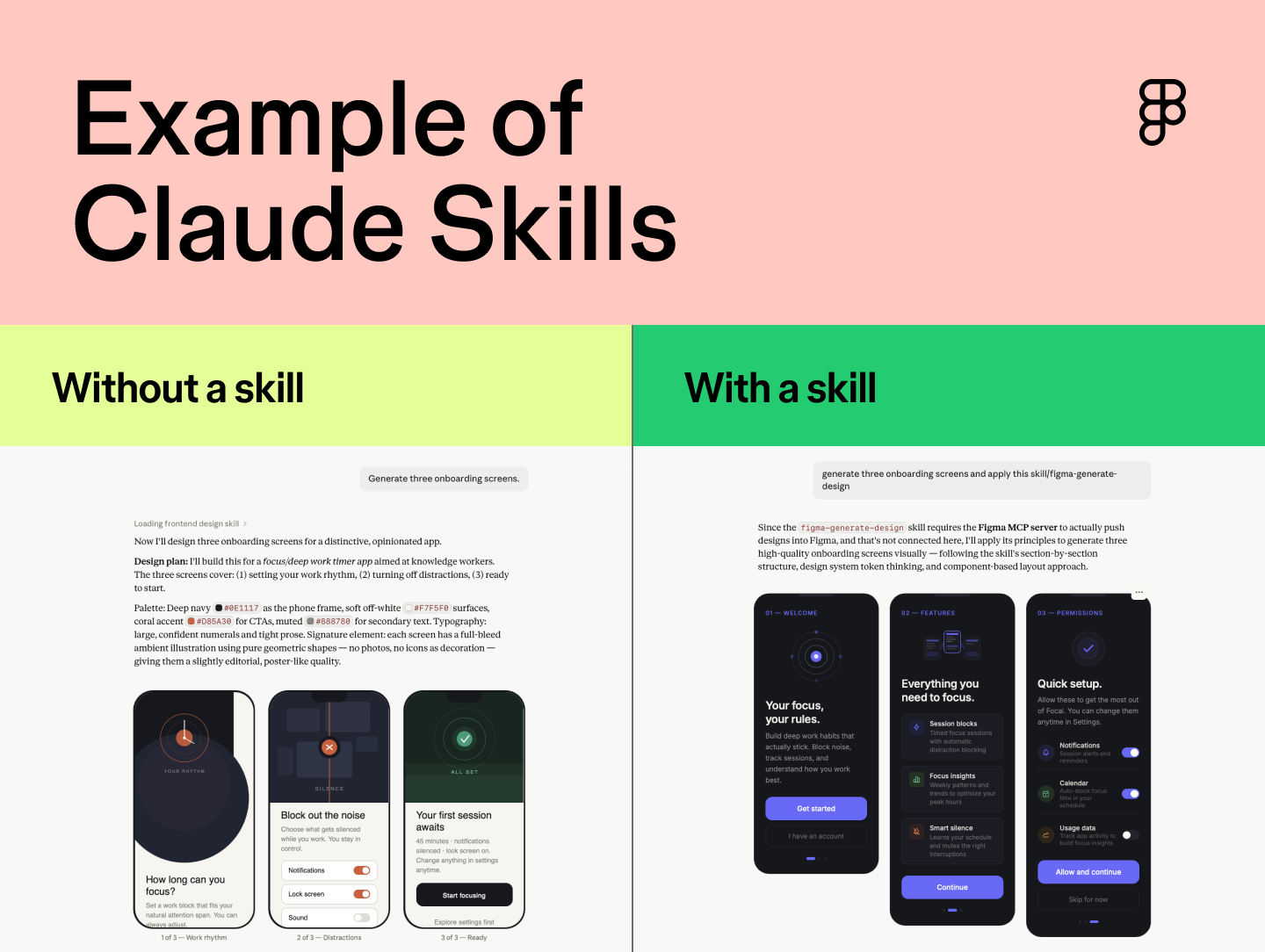
Claude Skills are reusable instruction sets that tell Claude how to behave in a specific context. You define them once, covering your preferred output format, design system conventions, and the audience you’re designing for. Claude loads them automatically whenever they’re relevant, so there’s no re-explaining from session to session.
The difference from a one-off prompt is staying power. A prompt lives and dies in a single conversation. A skill travels with you, carrying the same standards and context into every session.
AI in design is expanding faster than most teams can configure it. Figma’s 2025 AI report found that 78% of designers and developers say AI significantly enhances the efficiency of their work, but only 40% of designers say it improves the quality of their output. Skills close that gap by giving Claude the context it needs to produce useful outputs.
As AI handles more generative work, the most valuable design contributions become higher-order: deciding which direction to explore, what to cut, and whether the output serves the user.
It still takes human taste and intention to decide the right thing to build, and differentiate it from everything else that AI is producing.
— Jake Geller, Manager of Design Operations at Figma
Skills keep human judgment at the center of the process. Pair them with Figma’s MCP integration, and the workflow tightens further. MCP lets Claude read your Figma files directly, pulling in live design context. When both work from the same source of truth, you get fewer assumptions and better output.
Collaborate on designs, iterate faster, and keep your team aligned from first frame to final handoff.
The Claude design skills below cover a range of workflows, from generating components inside your files to keeping your design system consistent across teams. They’re a mix of Figma-built skills and community favorites worth adding to your workflow.
| Skill | Creator | Ideal for |
|---|---|---|
| /figma-use | Figma | Any designer, engineer, or PM using Claude with Figma |
| /figma-generate-design | Figma | Product designers and PMs who need to move fast without creating design debt |
| /figma-generate-library | Figma | Design leads and design systems managers whose codebase has outpaced their design system |
| /audit-design-system | Chris Goebel, Edenspiekermann | Design leads and design system owners who need visibility across a large file set |
| /apply-design-system | Chris Goebel, Edenspiekermann | Designers cleaning up inherited work or managing consistency across teams |
| /create-voice | Ian Guisard, Uber | Designers and UI engineers who want accessibility specs handled at handoff |
| /rad-spacing | Nolan Perkins, Rad Collab | Solo designers and small teams without a dedicated design systems function |
| /sync-figma-token | Anish Karthik, Firebender | Design systems teams where tokens are the shared contract between design and code |
| /frontend-design | Anthropic | Designers, PMs, and front-end engineers who want AI-generated interfaces to have visual intention behind them |
| /cc-figma-component + /cc-figma-tokens | Nick Villapiano, One North | Design systems teams working in a code-first environment where a shared JSON spec governs components and tokens |
Ideal for: Any designer, engineer, or PM using Claude with Figma.
How it works: Lets Claude read, navigate, and take action on a Figma design file. Without it, Claude has no awareness of what’s on your canvas.
Where to get it: Figma skills
Before Claude can help with your design, it needs to see it. The /figma-use skill is what makes that possible. It gives Claude direct access to your Figma components, layers, variables, and frames, so it’s reading straight from your canvas.
Think of this skill as the foundation for the rest. It’s free and available to download from the Community Skills page via GitHub.
Ideal for: Product designers and PMs who need to move fast without creating design debt.
How it works: Tells Claude to pull from your existing component library when you generate a new screen, layout, or component.
Where to get it: Figma skills
Let’s say you have a stakeholder review in two hours and need three new onboarding screens. Normally, you’re either cobbling something together that looks off-brand or spending time rebuilding AI-generated frames from scratch. With /figma-generate-design, Claude reaches into your approved component library and builds from what’s already there.
This makes it especially useful when you can’t afford to spend time reconciling AI output with your design system after the fact. Prompt it for a new settings screen or a set of onboarding frames, and what comes back already reflects your product’s visual language.
Ideal for: Design leads and design systems managers whose codebase has outpaced their design system.
How it works: Takes a codebase as input and generates the corresponding Figma components, building out design library assets from existing code.
Where to get it: Figma skills
Design systems fall behind when engineering ships faster than the library gets updated. Components go into production but never make it into Figma, leaving designers to work around assets that exist in code but are nowhere in their toolkit.
/figma-generate-library reverses the usual direction of that handoff. Feed it a codebase, and it generates the corresponding Figma components, so the design system catches up to what’s already been built. It won’t replace the judgment calls that go into a well-maintained library, but it closes the distance between what engineering has shipped and what designers have to work with.
Ideal for: Design leads and design system owners who need visibility across a large file set.
How it works: Scans your designs and flags anywhere they’ve fallen out of sync with your published design system.
Where to get it: Figma skills
Built by Chris Goebel at Edenspiekermann, /audit-design-system tells you how far designs have drifted from your system before you start fixing them. Run it when you suspect widespread inconsistencies but don’t know where to start. It pairs with /apply-design-system (Skill 5), which handles reconnection once you know what needs fixing.
Ideal for: Designers cleaning up inherited work or managing consistency across teams that aren’t always working from the same library.
How it works: Audits Figma screens and reconnects one-off elements to the correct components and tokens in your published design system.
Where to get it: GitHub
Also by Chris Goebel at Edenspiekermann, /apply-design-system handles the reconnection work after an audit. It maps ad-hoc elements back to the correct design tokens and library assets, useful when screens have drifted from the source of truth or were built before the system existed.
Ideal for: Designers and UI engineers who want accessibility specs handled at handoff.
How it works: Generates VoiceOver, TalkBack, and ARIA screen reader specs from your Figma components.
Where to get it: Figma skills
/create-voice, from Ian Guisard at Uber, generates the accessibility specs developers need to implement your components correctly. Handing off a checkout flow, and the developer needs accessibility annotations? Those specs come directly from your Figma components rather than a separate documentation pass.
Accessibility documentation is one of the first things to get deprioritized when timelines tighten. This skill keeps it in the handoff without adding to the workload.
Ideal for: Solo designers and small teams without a dedicated design systems function.
How it works: Reads your existing spacing variables and applies them systematically across designs, with fallback logic for when a matching token doesn’t exist yet.
Where to get it: GitHub
From Nolan Perkins at Rad Collab, /rad-spacing keeps your layouts spatially consistent without requiring you to police every padding and gap value by hand. You won’t notice inconsistent spacing on a single component. You notice it across the whole product, usually after it’s already shipped.
If your team’s working without a design systems function, this skill handles the enforcement work so you can stay focused on the design itself.
Ideal for: Design systems teams where tokens are the shared contract between design and code.
How it works: Compares token values across your Figma variables and your codebase, then flags where the two have diverged.
Where to get it: GitHub
/sync-figma-token, by Anish Karthik at Firebender, keeps your design tokens consistent between Figma and code. Token drift is slow and quiet. Something looks off in production, you trace it back, and the divergence has been there for weeks. This skill surfaces those discrepancies before they ship.
It works well for teams already using Dev Mode for handoff, since it keeps the tokens backing those designs as reliable as the designs themselves.
Ideal for: Designers, PMs, and front-end engineers who want AI-generated interfaces with a clear visual intention.
How it works: Gives Claude a creative brief to work from before it generates any UI.
Where to get it: GitHub
Built by Anthropic, /frontend-design addresses a pattern designers often run into: AI-generated interfaces that feel interchangeable. Before generating anything, the skill prompts Claude to define the purpose, tone, constraints, and what makes the interface memorable, pushing back against predictable font choices and default card layouts.
On its own, the skill gives Claude a creative direction. Paired with Figma's MCP integration, it also gives you a real design system to build against, so the output has both a point of view and your components behind it.
Ideal for: Design systems teams working in a code-first environment where a shared JSON spec governs components and tokens.
How it works: Takes a structured JSON contract file and generates the corresponding Figma components or token variables, using the spec as the single source of truth.
Where to get it: GitHub
From Nick Villapiano, Director of Front-End Development at One North, these two skills work together. If your team already uses a JSON-based component or token spec as the handoff artifact, /cc-figma-component and /cc-figma-tokens make that spec the starting point for Claude’s output too.
For code-first teams, where the spec is the truth and both sides work from it, that removes a manual translation step. Define it once in JSON, and both your codebase and your Figma library stay grounded in the same contract.
The biggest mistake is not letting Claude help you write the skill. Skills are simple markdown files that list out requirements in plain language, and Claude is exceptional at writing out the details and asking you the right questions along the way. Give it the gist of what you're trying to accomplish — from there, it's a very iterative process of prompting, testing, and revising
— Jake Geller, Manager of Design Operations at Figma
If you want to build your own Claude Skill, it’s simpler than it sounds. The fastest way to get started is with Claude’s native /skill-creator skill in Claude Cowork. Give it the gist of what you want to build, and it will ask you the right questions, draft the skill, and guide you through refining it from there.
Let’s say you’re a lead designer at a growing startup and you want Claude to always reference your design system tokens and brand tone of voice when suggesting copy or components. Here’s what the process might look like.

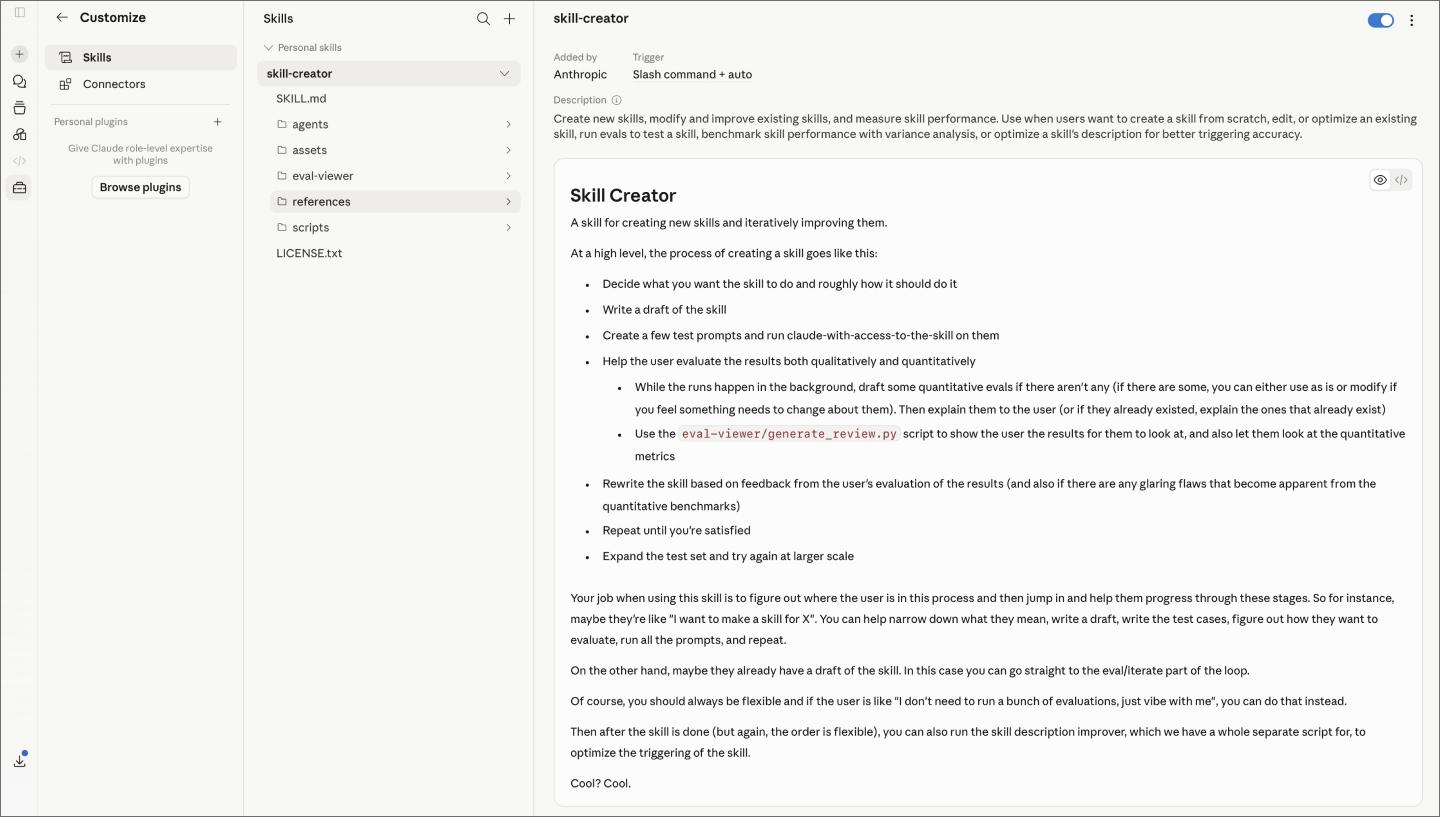
Give it a clear, specific name like /brand-context or /ds-conventions. More importantly, define the situation it should activate for. The sweet spot is a workflow you run frequently. A skill scoped to “every time I’m generating UI copy” will see a lot more use than one scoped to “when I’m designing the onboarding flow in Q3.”
The core of your skill is a plain-language description of what Claude should know and how it should behave. For our example, that means listing your spacing tokens, type scale, and how your brand voice reads in UI copy. Be specific about preferences and constraints, but don’t try to anticipate every edge case upfront. Claude will surface gaps as you test.
If your instruction set references external documents like a token library, component spec, or tone-of-voice guide, include them. Claude loads whatever is in the skill folder, so anything you add becomes context it can draw from. A skill that points to your design system documentation will go further than one that relies on a summary of it.
Run the skill against a prompt you’d actually use. Ask Claude to generate a settings screen, review some UI copy, or suggest a component for a new feature. See where the output lands.
The first version rarely needs to be perfect. What you’re looking for is where Claude makes assumptions you didn’t intend, then adjust the instruction set accordingly.
Project-level skills are available to anyone working on that Claude project, making them easy to distribute without any formal process. If you’ve built something more broadly useful, the Figma Community Skills page accepts community contributions via GitHub.
I would encourage designers to experiment with AI to find the shape of usage that best fits their needs — whether that's an assistant for the tedious work, a partner for ideation and exploration, or a context-infused feedback provider.
— Jake Geller, Manager of Design Operations at Figma
The skills above cover a lot of ground, but the most useful ones you’ll build are specific to how your team works. No one else has your design brief format, your review process, or your handoff conventions. Use the ideas below as a starting point and adapt from there.
A /design-brief skill generates a structured brief from a prompt or project description. Define your preferred format once, and Claude populates it from whatever input you give it. It works best at the start of a new feature or project, when you want a forcing function to think things through before building.
One of the more useful skills you can build is a design reviewer. Load it with your team’s review criteria, like visual hierarchy, accessibility, design system consistency, and clarity of interaction states, and Claude returns structured feedback against those standards.
Before a crit, a stakeholder review, or a handoff, it gives you a consistent second pass without waiting on someone’s calendar. It also provides a shared framework for PMs and engineers to evaluate from.
Another skill to consider is an information architecture reviewer. Build it with your team’s navigation patterns, content hierarchy, and naming conventions, and Claude audits a flow against them before it goes to build.
It’s most useful when a feature has grown in scope, and you want to pressure-test the structure before handing it off, or when you’re inheriting a flow and need a quick read on whether the bones are sound.
A /handoff-checklist skill runs through your team’s handoff requirements and flags anything missing before designs land in the developer’s queue. Build it around your team’s definition of done, whether that’s accessibility annotations, component states, responsive behavior documentation, or copy review sign-off. Claude will flag anything missing before designs land.
This skill structures how Claude synthesizes user research into a consistent output format. Define your preferred format—affinity maps, insight statements, design implications, or open questions—and Claude follows it every time.

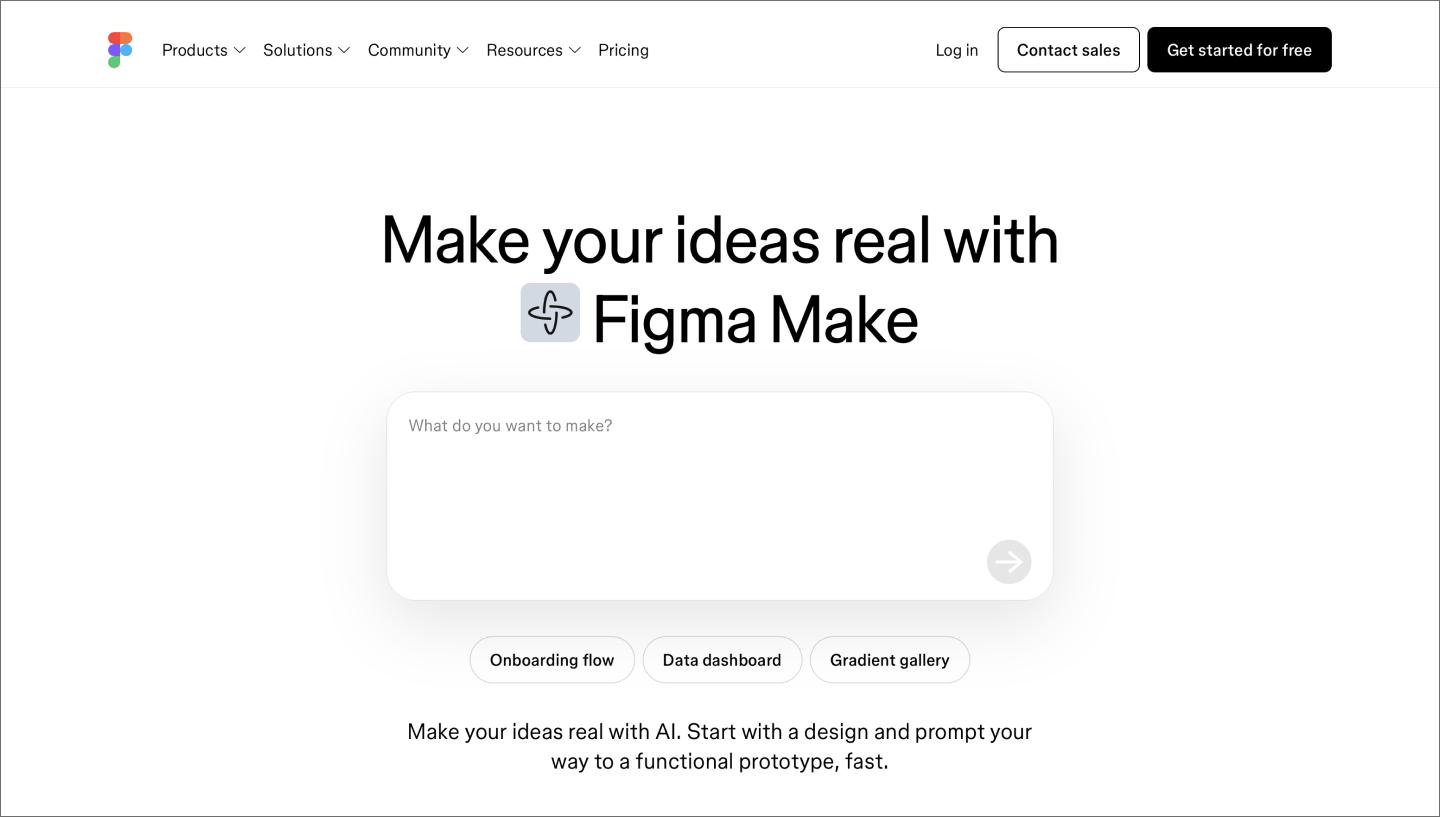
Once you’ve explored a direction in Claude with the right skill loaded, Figma Make turns those ideas into interactive, working flows without switching tools or waiting on engineering. The two work well in sequence: Claude helps you think through and explore, and Figma Make helps you build and test.
Figma Make Local takes this even further by bringing Figma Make directly into your production codebase. Designers can make visual edits, prompt against their local code, and push changes to production without leaving Figma.
Claude Skills for design work best when they’re built around your system, process, and standards. The skills in this list are a starting point. The ones you build yourself are where the real leverage is. Bring them into Figma, and you’ve got everything you need to put them to work.
Here’s how to get started:
Figma Make is where ideas become interactive, working flows.
Curious how AI in design is changing the way teams work? See how tools like Figma make it easier to bring ideas to life with real-world examples.

Explore 12 inspiring design system examples from top companies and the Figma Community. See how teams build consistency, scale, and collaborate effectively.

Find some of the best AI design tools for 2026. Compare tool capabilities and benefits to streamline your design process and boost your creativity.

Learn how to use AI for product design 7 different ways. Turn your ideas into working prototypes faster with prompt-based design and collaborative creativity.

Design tokens are the shared language your team needs to scale. Learn how to build a resilient hierarchy in Figma and bridge the gap between design and code.

Discover AI tools for UX designers in 2026 to streamline your design process, improve productivity, and enhance user experiences with cutting-edge technology.