What is Model Context Protocol (MCP)?


Share What is Model Context Protocol (MCP)?
Explore more from
Design basics
From wireframe to website, faster
Design, prototype, and refine every page.


AI models have become increasingly powerful, but there's a catch: They only have access to the information they learned during training, so they’re limited in what they know and can do. It's like hiring a really smart assistant who can only work with whatever's already in their head, and can't look things up, check your files, or actually do tasks for you.
Large language models (LLMs) become a lot more powerful when they can access context and take action in other tools and applications. Until recently, there wasn’t a uniform way for these models to connect with other apps. Model Context Protocol (MCP), originally developed by Anthropic, is quickly becoming the standard way for AI agentic systems to interface with other applications—the “USB-C connector” for AI.
To read more about how Figma supports MCP, check out our blog post introducing Figma’s MCP server. Let’s dig deeper into what MCP is, how it works, and why it matters.
What is MCP?
Model Context Protocol (MCP) is an open source standard for how AI-powered systems can connect to software applications, tools, and platforms.
MCP is a two-way communication protocol. On one side, you have data providers and app developers who want LLMs to be able to access data and take action in their software. They support MCP by building what’s called an MCP server. On the other side, you have developers building AI-powered tools or agentic systems. They implement an MCP client, which lets their AI models connect to MCP servers to fetch context and complete tasks in other apps.
For example, an AI coding tool like Cursor might have an MCP client that connects to the MCP server provided by Figma and GitHub. Communication between clients and servers happens using a standard protocol—just like how HTTP defines a communication protocol for the internet. MCP specifies what kinds of messages can be sent, how they’re formatted, how authentication works, and more.
The problem: Why we need MCP
Booking flights for an upcoming vacation, pulling analytics data for a weekly sales report, building a prototype of a new feature—these kinds of tasks require context that goes beyond an LLM’s training data and extends to a broad ecosystem of apps and services. The more context an AI assistant has, the better it’s able to understand the specific nuances of a request and deliver a high-quality output.
Consider the scenario of using an AI coding tool to generate code from a design file. If an LLM views a screenshot of the file and uses its training data to interpret the pixels, it might be able to create a rough prototype. But to get to a really useful end product, it needs more context, like the specific variables, components, and styles, or even pseudocode describing the functionality. This kind of context is invaluable for AI, but typically, it lives deep inside other tools (like Figma).
Before MCP, every developer working on AI agentic tools had to build custom integrations with external apps and services, resulting in slower development and ecosystem fragmentation. With every app exposing data and functions in slightly different ways, each new integration would require a significant amount of upfront work.

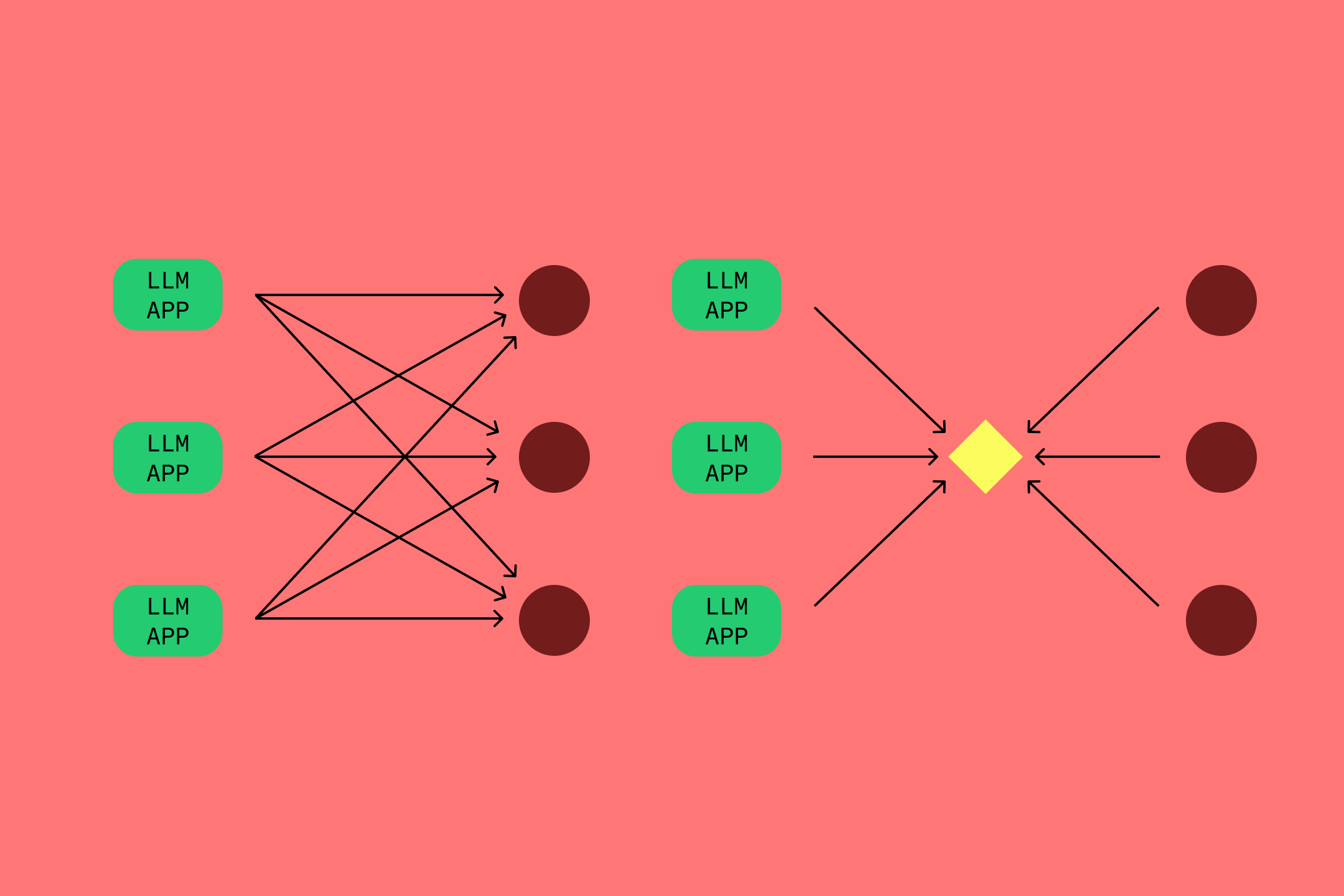
MCP is a “write once, use anywhere” approach to the problem. An app developer can write a single MCP server for any AI agentic system to use, providing a canonical set of tools and data along with helpful functionality like error handling. Similarly, an AI system can implement the protocol and connect to any MCP server that exists today or in the future.
The origin of MCP
MCP started at Anthropic in summer 2024 to give Claude Desktop an easier way to work with data sources like the local file system. The authors drew inspiration from Microsoft’s Language Server Protocol (LSP), the standard for how integrated development environments (IDEs) support features like context highlighting or code completion across many different programming languages.
After building the protocol and using it internally, Anthropic open-sourced MCP in November 2024, publicly releasing the full protocol specification along with documentation and SDKS (e.g., Python).
Since then, adoption has grown significantly. In January and February 2025, many AI IDEs, like Cursor and Windsurf, started supporting MCP. In March, OpenAI added MCP support, and GitHub released its MCP server soon after. Mature products are adopting MCP as well: Microsoft Windows announced it will support the protocol in the coming months.
Double click: What does MCP mean for agentic AI?
The sudden boom in MCP has kicked excitement about the agentic web into high gear. Is this the missing link we’ve needed between AI and all our other tools?
How does MCP work?
MCP is essentially a back-and-forth of requests and responses: the LLM asks for data or triggers an action, and the external app answers. In networking terms, MCP follows a client-server architecture where one side (the client) sends a request and the other side (the server) returns data or performs an action.
The MCP specification defines three types of features that servers offer to clients:
- Resources: Data and content that the app offers to LLMs, like database records, files, screenshots, or code blocks.
- Tools: Functions that perform actions in the app; for example, a PostgreSQL MCP server may expose a tool to run an SQL query within a database.
- Prompts: Pre-defined text templates and workflows that AI systems can use, which are designed to work well with the app’s resources and tools.
MCP defines how servers should expose resources, tools, and prompts to clients in a standard way, including:
- Response formatting: Data can be sent as JSON blobs, SQL rows, or even raw images—the MCP server converts whatever it gets into a standard format that MCP clients expect (JSON-RPC 2.0).
- Command parsing: The MCP server acts as a translator, turning requests from LLMs into commands that apps can work with, like API calls.
- Error handling: MCP defines standard error codes and sends errors back to the LLM so it can retry or ask the user for assistance.
- Tool discovery: MCP servers expose a function that lists the available tools on that server, so an AI system can quickly see what actions it can perform in an external app.
The architecture: MCP hosts, clients, and servers
MCP relies on an architecture pattern that’s common in networking, involving hosts, clients, and servers. The protocol defines specific responsibilities for each role.

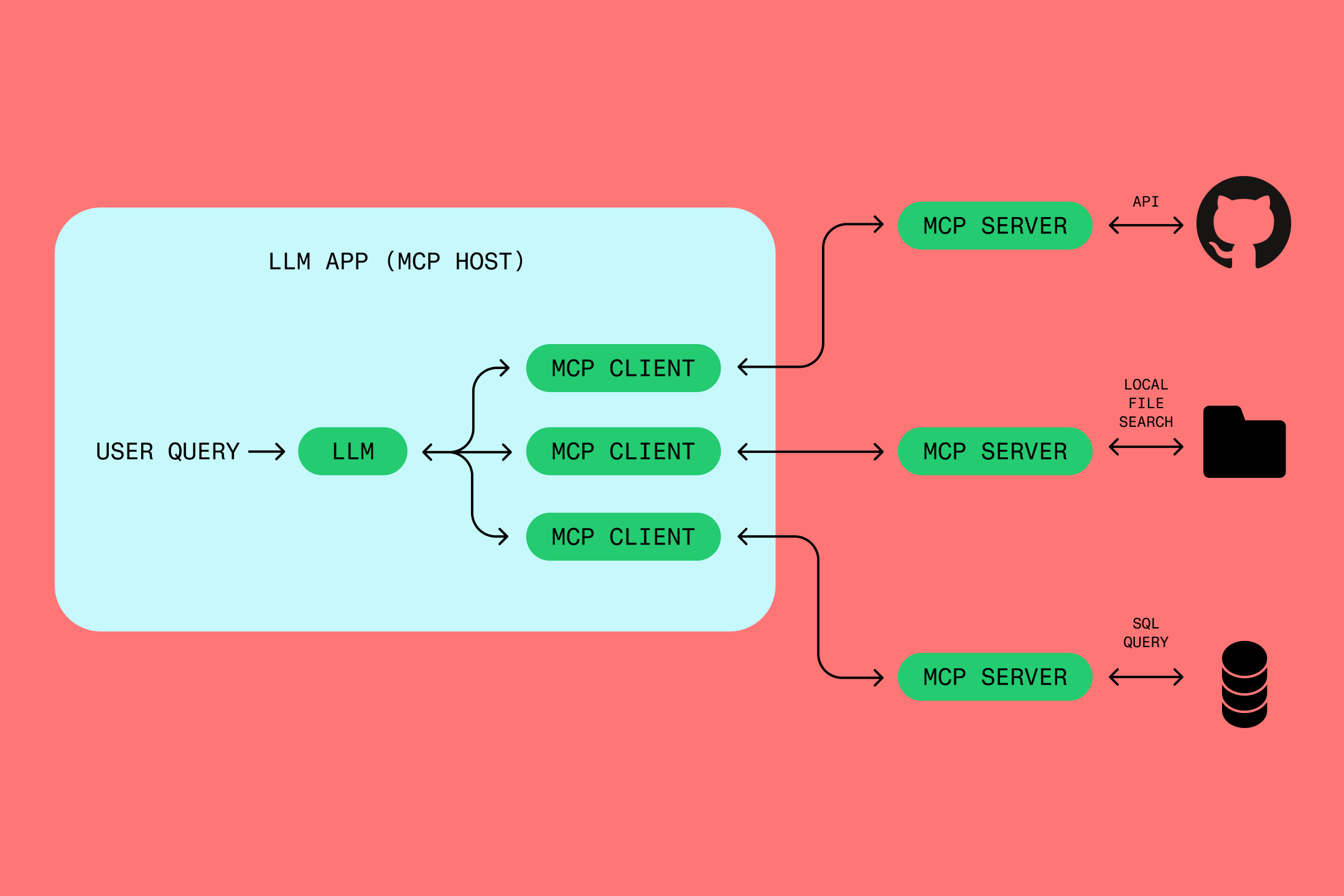
- MCP hosts: Hosts manage the discovery, permissions, and communication between clients and servers. Typically, the host is the product or platform—like Windows OS or Claude Desktop—where users access AI agents to perform tasks. When the model needs access to an external app, the host launches and connects that app’s MCP server and the matching client.
- MCP clients: Clients start and maintain a connection to MCP servers, with one client per server. Clients pass requests and responses back and forth between LLMs and MCP servers.
- MCP servers: Servers directly plug into external systems (like Figma, Google Drive, or Postgres), providing LLMs with access to data and functionality. MCP servers receive requests from MCP clients and translate them into commands for external apps, like API calls or database queries. They also receive and parse out the app responses into a standard format. Since app developers implement MCP servers, they can control what LLMs get access to, and the protocol provides guidelines around security and permissions.
To see how the pieces fit together, let’s run through a sample workflow using Figma’s MCP server:
- A user opens up Cursor, an AI coding tool with MCP enabled, in their code repo.
- The user asks the LLM in Cursor to pull their latest Figma file and implement it in their codebase.
- Cursor spins up the Figma MCP server as well as a corresponding MCP client.
- The LLM receives the list of available prompts, resources, and tools from the server (via the client).
- The LLM then sends a message to the server containing the tool it wants to call along with any parameters (e.g., the Figma file ID). The server formats this into an API request and sends the request via Figma’s API.
- The server waits for the file data from the Figma API response, formats it into a string, and sends it back to the LLM (via the client).
- With all the additional context from Figma, the LLM can then start generating the relevant code within Cursor.
Benefits of MCP: Why it matters for AI integration
Developers are adopting MCP because it simplifies connecting LLMs to apps. Compared to custom integrations, MCP has several advantages.
First, developers of AI agentic systems only need to integrate MCP once, and they can then use any MCP server. External application developers only need to create one MCP server, and then any MCP-enabled AI tool can connect to it.
Second, since every MCP server and MCP client must offer the same core interface, switching servers and clients is trivial. That means developers and users can switch between apps like Dropbox and Google Docs, or Slack and Microsoft Teams, with ease.
Finally, as AI products become more context-aware through MCP, AI tools get better for users everywhere. And a standard protocol for the ecosystem means that developers spend less time writing boilerplate integration code, and more time developing new features.
MCP vs. traditional APIs: What's the difference?
Why not use an API instead of MCP? It’s a common question, since APIs provide access to much of the same data and actions in apps. In fact, many MCP servers use APIs behind the scenes to surface data and actions.
The short answer is that MCP lets AI assistants use one set of commands for all APIs, greatly simplifying the integration. Whereas working directly with APIs requires writing custom code for requests, responses, and retries, with MCP, a developer can get the same results by just importing the MCP server. Switching between MCP servers is easy, while switching APIs requires writing a whole new set of code.
MCP is also better optimized for LLM usage. MCP guarantees that everything an LLM needs to access a system is well defined and well documented, in a structured way. Ad hoc API definitions might be missing important descriptions, or make data available in ways that AIs can't understand or might easily misinterpret.
How MCP and AI agents go hand in hand
An AI agent is any AI that takes action in the real world for you. MCP makes it much easier to build AI agents. Instead of integrating APIs one by one, a developer can implement the protocol to let their AI tool take action in any MCP-enabled application.
As the MCP ecosystem grows, agents become more powerful, too. AI agents need to be able to plan and take action across multiple tools in a user’s workspace—the more tools an agent can work with, the more useful it becomes to users. With MCP, agents can easily find and use a growing number of tools for task automation.
MCP vs. A2A: How the protocols complement each other
MCP isn’t the only new LLM protocol around—recently, Google announced the Agent2Agent (A2A) protocol. But developers don’t need to pick one or the other. These protocols solve different problems and actually complement each other.
MCP focuses on enabling AI systems to learn about the world and take actions in it. A2A focuses on helping AI systems communicate with each other about their work and intentions—to collaborate, assign work, argue, delegate, or negotiate.
Two agents might use A2A to decide which one of them is going to do some work, and which one of them is going to supervise the work. Then, they might use MCP for giving each other instructions on work to be done and data to use.
The future of MCP and AI integration
The MCP team continually updates the protocol, with new releases shipping multiple times a month. MCP is also an open standard, so the larger AI community can contribute to the roadmap. We can expect to see more of a focus on security in the coming releases: authentication, authorization, and data filtering or privacy mechanisms for specific domains (like healthcare or finance).
If MCP grows to see wide adoption, then entire portions of the AI industry may begin optimizing their use of MCP. Model developers might start to include MCP tool usage in their training data, and LLM orchestration frameworks (e.g., LangChain) may support MCP as a first-class citizen in their use cases.
Over time, MCP could become the de facto standard for connecting AI to the entire digital landscape of tools and services. Bringing data and actions from external systems into LLM experiences will become increasingly plug-and-play in the AI ecosystem. For developers, that translates into fewer bespoke wrappers, better AI tools, and more time to build the features users really value. For companies shipping data-rich apps, it means instant compatibility with every MCP-enabled AI platform. And for end users, it unlocks better AI applications and personal assistants that can finally fetch the right context, push the right buttons, and get real work done without tedious intervention.
Bring Figma directly into your development workflow
The Dev Mode MCP server allows tools like VS Code, Cursor, Windsurf, and Claude Code to retrieve information directly into Figma to help agents better turn your designs into code.