
AI in design: Transforming the way we create
Curious how AI in design is changing the way teams work? See how tools like Figma make it easier to bring ideas to life with real-world examples.
Skip to main content
Building with AI

With AI, you can generate an image in seconds. Generating the right image takes a lot longer. That tension is what generative AI design aims to solve.
Figma’s 2025 AI report found that 33% of designers are already using AI to generate design assets. For most, it means starting from scratch each time, with outputs that don’t hold up when requirements change. Generative AI design is the practice of building something more structured around the generation, where brand references and editing tools shape the output as much as the prompt does.
Read on to learn:
Generative AI for design is the practice of using AI tools to produce visual content, like imagery, video, illustrations, and 3D assets. A designer might use it to generate a campaign image from a brand reference, stress-test a visual direction across formats, or produce variations for a side-by-side comparison. From there, designers use compositing, masking, and other professional tools to bring outputs closer to the final vision.
Generative AI design is really the practice of using AI as part of a broader creative workflow—generating, editing, refining, reviewing, adapting, and scaling assets for real production needs.
— Neta Kimhi, Figma Weave Marketing Manager
Figma Weave brings all of this onto one canvas, combining AI generation with professional editing tools so teams can take an output from rough to finished without switching apps.
For many teams, the challenge is determining where generative AI design tools fit. These are the stages where generative AI has the most impact.

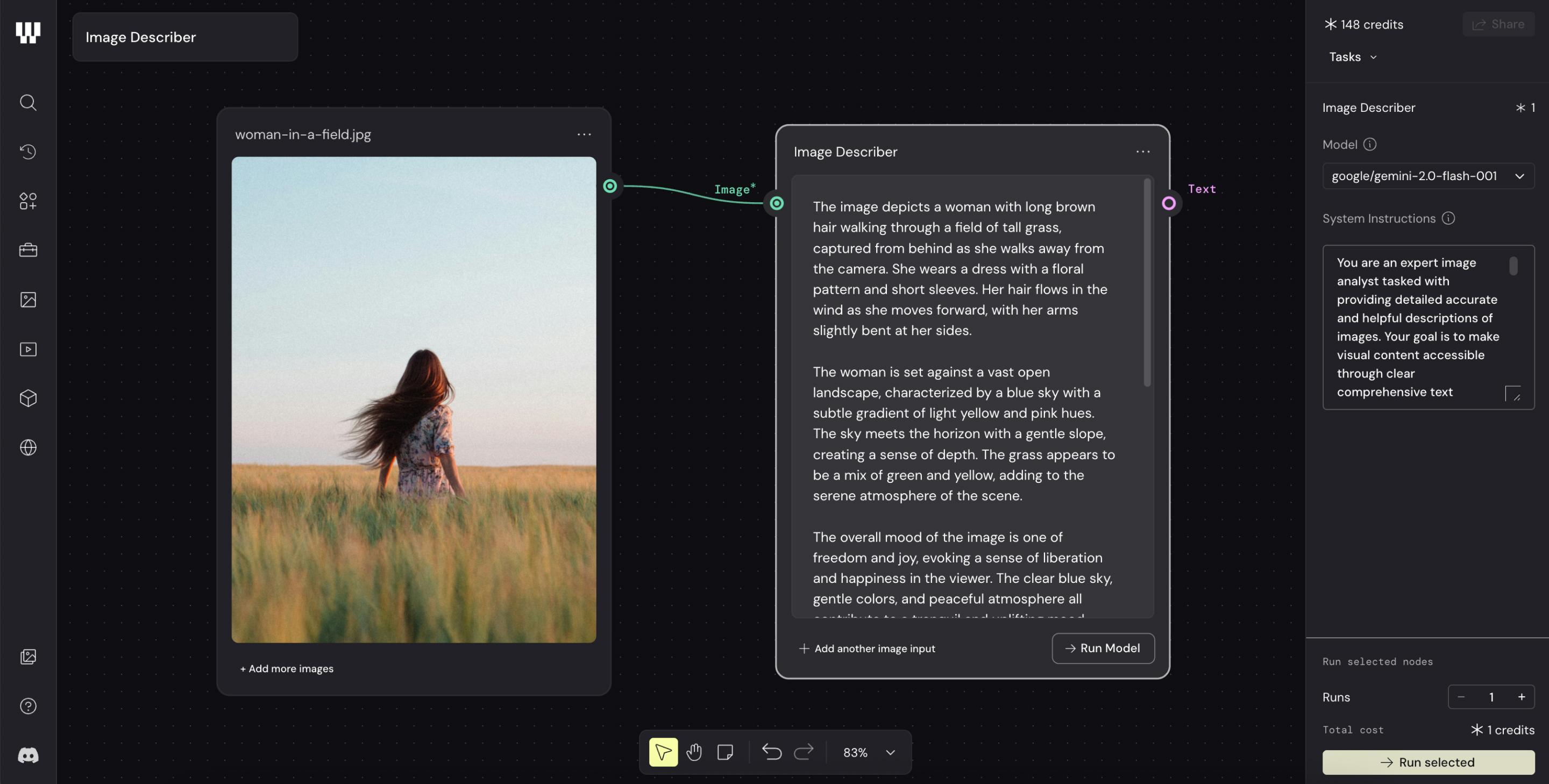
Before generating anything, define a visual style you can carry into every workflow. If you have a mood board or existing brand assets, they’re the strongest starting references for texture, color, and mood. Skipping this step is the most common reason AI-generated work looks generic.
In Figma Weave, the Image Describer node does this automatically. Feed in a reference image, and it produces a reusable style definition you can connect to any generation node in your workflow, so every output starts from the same foundation.

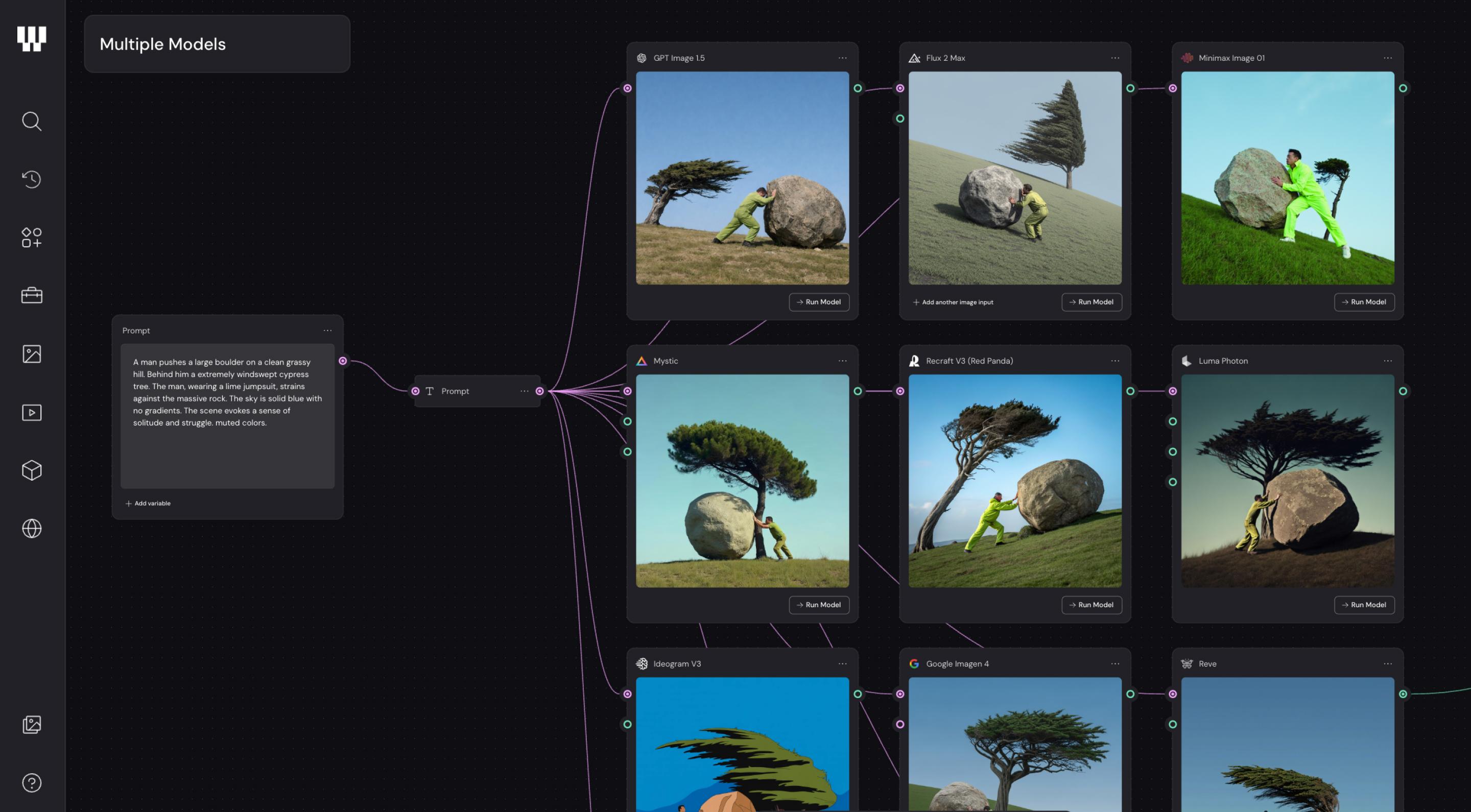
With a style foundation in place, you can generate variations across multiple AI models in one pass and evaluate them side by side. Different models interpret the same prompt differently, and seeing those options side by side makes it easier to see what’s working.
Figma Weave connects to 12+ models, including Google, OpenAI, and Runway, so you can run them simultaneously. Your style definition carries into every output, keeping results grounded in the same visual direction regardless of which model produces them. Then you choose what fits best and move to refinement.
Once you’ve landed on a direction, the next challenge is adapting it across every channel and format it needs to live in. In a traditional production workflow, that means manual resizing and reformatting for each placement. In a structured generative design AI workflow, that work happens automatically.
Figma Weave handles format adaptation as part of its workflow, adjusting outputs for different aspect ratios across mobile, desktop, social, and beyond. Assets then move into Figma Design, where they slot into your existing components and shared libraries, ready for production.
The most common way teams approach AI generative design is also the least effective: write a prompt and take whatever comes out. The output might look impressive in isolation, but it has no connection to the brand and no clear path to adaptation. One brief later, you’re starting from scratch again.
The biggest mistake is believing there’s a perfect prompt that will produce a production-ready asset in a single step. The teams that get the most value from AI stop chasing magic buttons and start thinking about systems.
— Neta Kimhi, Figma Weave Marketing Manager
Avoiding that cycle means building something more deliberate behind the generation. When brand references inform the style and designers actively shape the outputs, the results are much stronger.
While generative AI is changing what designers spend time on, it doesn’t change whether designers are needed. AI speeds up execution tasks, so the designer’s job moves upstream. You can spend more time setting the visual foundation and making judgment calls.
When everyone has access to the same models, differentiation no longer comes from the model itself. It comes from creative direction, taste, workflow design, editing decisions, and the ability to combine tools in unique ways.
— Neta Kimhi, Figma Weave Marketing Manager
This is what we call Artistic Intelligence—the idea that craft and AI work better together when the designer directs the process rather than reacts to its outputs. The teams doing the most distinctive work with generative AI are the ones who’ve stayed in creative control throughout.
Generative design is an engineering method that uses algorithms to optimize physical objects based on constraints like materials and manufacturing requirements.
Generative AI design applies AI models to creative work, producing imagery and other visual assets as part of a design workflow. The two terms get conflated, but they serve completely different disciplines.
A standalone image generator produces a single output from a prompt. A generative AI design workflow chains multiple steps together, applying style references, comparing outputs across models, and refining results with editing tools. The process becomes repeatable, and the outputs stay consistent with your brand.
Generative AI design can produce a wide range of visual content, from static imagery and video clips to 3D assets and illustrations. Teams use it for campaign imagery, product mockups, background generation, and brand explorations. More advanced workflows can chain these asset types together, generating and refining multiple formats in one pass.
The right tool depends on what you’re trying to do. Tools like Adobe Firefly and Midjourney are popular for image generation, while Figma Weave is built for teams that need to produce on-brand visual assets at scale. For AI-assisted prototyping and UI work, options like Figma Make and Uizard let teams generate functional interfaces from prompts.
A common example is a creative team producing campaign assets. They feed existing brand photography into a tool like Figma Weave to establish a style definition, generate variations across multiple AI models, and adapt the final assets to different formats. The prompt starts the process, and the workflow prepares the output for production.
Generative AI design is most powerful when it’s part of a process where the whole team works from a shared creative direction. The workflows you build become reusable assets in their own right—faster to produce consistent, on-brand work at scale. With Figma, you’ve got everything you need to build that process, from ideation to final delivery.
Here’s how to get started:
Figma Weave lets you chain AI models, apply brand references, and refine outputs with professional editing tools, all in one canvas.
Curious how AI in design is changing the way teams work? See how tools like Figma make it easier to bring ideas to life with real-world examples.

Find some of the best AI design tools for 2026. Compare tool capabilities and benefits to streamline your design process and boost your creativity.

Learn how to use AI for product design 7 different ways. Turn your ideas into working prototypes faster with prompt-based design and collaborative creativity.

Build a powerful AI product design stack with these 5 specialized tools. Unify your workflow, from concept art to code, for maximum speed and efficiency.

Learn how AI in product management translates to faster prototypes and better alignment. Discover how Figma Make can support your workflow.

Explore 12 inspiring design system examples from top companies and the Figma Community. See how teams build consistency, scale, and collaborate effectively.