
How to use AI for product design
Learn how to use AI for product design 7 different ways. Turn your ideas into working prototypes faster with prompt-based design and collaborative creativity.
Skip to main content
Building with AI

A developer on your team fires up Cursor or Claude Code, describes a goal, and watches it plan out a dozen steps, run them, and fix its own mistakes along the way. No follow-up prompt required. The infrastructure that makes this possible is called an agentic framework.
According to our 2025 AI report, 51% of Figma users working on AI products are building agents, compared to just 21% last year. Agentic frameworks are a big reason why. They’re the layer that turns a single AI response into a sustained, goal-driven workflow.
Read on to learn:
An AI agent’s autonomy doesn’t come from the model alone. It emerges from a framework that combines core components with structured design patterns. The components define what an agent can do, while the patterns define how it does it.
Think of the framework as the system that enables reasoning, memory, and action—and the design pattern as the strategy that organizes those capabilities into a working loop.

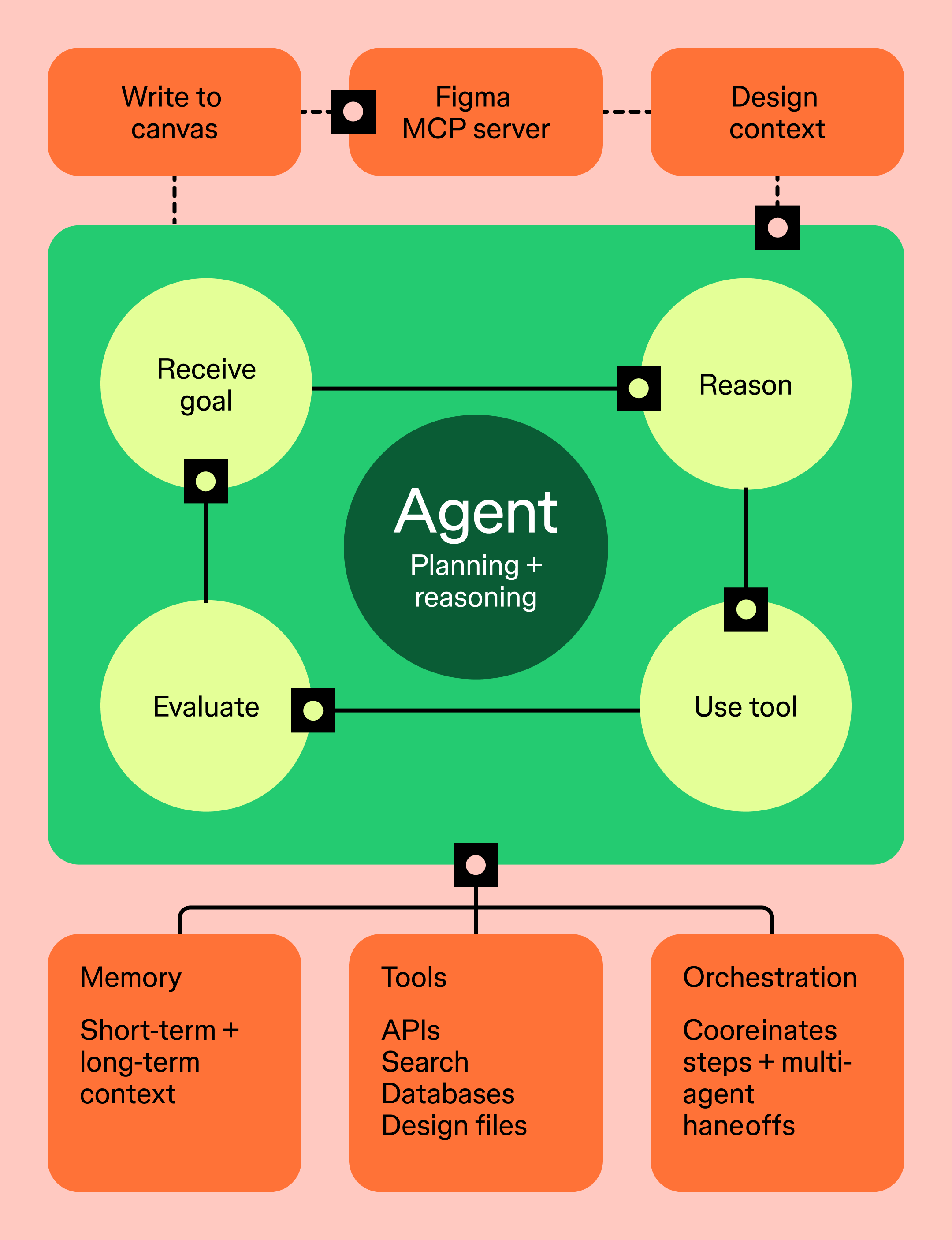
At the center of every agentic system is the ability to plan and decide what to do next. Design patterns shape how that happens. Some frameworks handle this through explicit planning stages, while others rely on chain-of-thought reasoning built into the model itself.
For example:
Both patterns rely on the same underlying capability—reasoning—but structure it differently depending on task complexity.
Picture an agent generating design variants for a new onboarding flow. In a ReAct pattern, it explores components dynamically. In Plan-and-Execute, it maps the full flow first, then builds each screen in sequence.
You can see this same idea at work in Figma Make. Turn on Plan mode before you start a build, and Make reads your project, any attached designs, and your prompt, then puts together a structured plan in a plan.md file you can review. You can edit the plan directly or ask Make to revise it, and refine it as many times as you need before anything gets built.
Once the plan looks right, click Build, and Make executes it. Instead of jumping straight to execution, the agent pauses to lay out its approach first, the same split between deciding what to do and doing it that sits at the core of every agentic framework.
Tools give agents the ability to act on external systems, not just generate text. These tools can include APIs, databases, search engines, code execution environments, or design platforms.
Tool-calling is both a capability and a pattern. The framework enables tool access, while the pattern determines when and how tools are used within the reasoning loop.
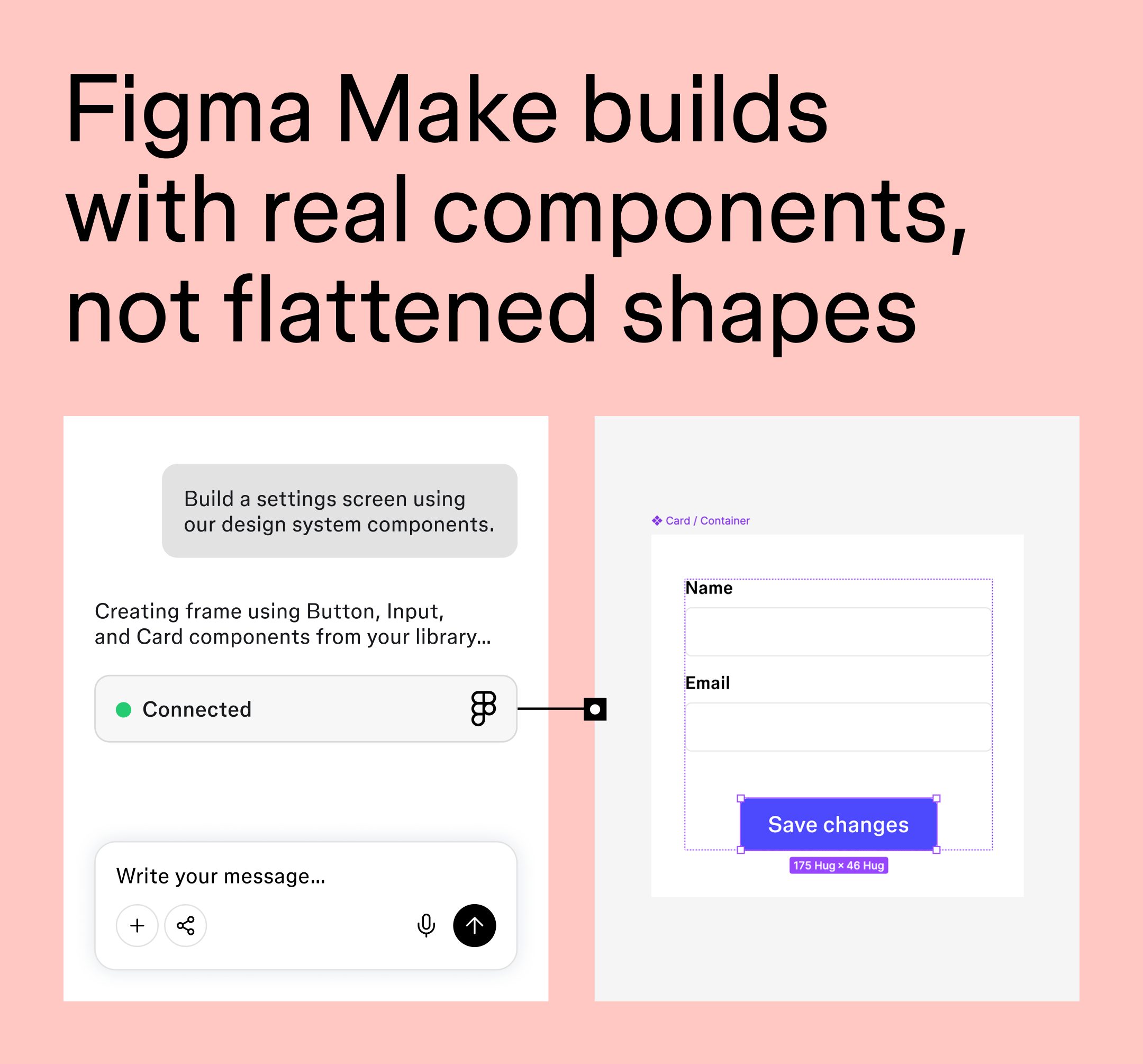
This is where the Figma MCP server comes in. It acts as a tool an agent can call to:
Built on the Model Context Protocol (MCP), this read-and-write capability makes Figma environments accessible and actionable for agents.
Memory allows agents to retain and reuse information across steps or sessions. Most frameworks separate this into:
Design patterns determine how memory is used. A ReAct agent might continuously update context as it works, while a multi-agent system may share memory between specialized agents.
For example, an agent could recall your team’s token naming conventions or reuse feedback from a prior design review when generating new variants.
Orchestration coordinates how tasks are executed—either by a single agent or across multiple agents.
In multi-agent patterns, a coordinator delegates work to specialized agents. For example:
The framework provides the routing and coordination logic, while the pattern defines how responsibilities are divided.
Advanced agentic frameworks include evaluation mechanisms that allow agents to assess and refine their own outputs.
This capability is often embedded into design patterns as iterative loops:
Agents can self-correct, but human oversight still matters. Designers and PMs still need to validate outputs before anything ships.
Go from product idea to interactive prototype using natural language.
The agentic framework landscape grew fast, then started to consolidate. Here’s a look at the frameworks product and engineering teams are most likely to run into today, from developer-built backends to the tools your team may already be working alongside.
| Framework | Memory | LLM support | Reasoning | Security | Architecture |
|---|---|---|---|---|---|
| LangChain | Short-term by default, connects to external stores | Broad, model-agnostic | Chain-based prompting, supports ReAct | Community-maintained | Chain or agent-based |
| LangGraph | Persistent state through checkpoints | Broad, model-agnostic | Graph-based, conditional branching | Enterprise tools via LangSmith | Graph-based orchestration |
| CrewAI | Short-term plus shared memory across a crew | Broad, provider-agnostic | Role-based task delegation | Community core, enterprise tier available | Multi-agent, role-based |
| Microsoft Agent Framework (AutoGen + Semantic Kernel) | Session-based state management | Multi-provider, including Azure OpenAI and Anthropic | Group chat, debate, and reflection patterns | Enterprise-grade, Microsoft Entra ID | Graph-based, single or multi-agent |
| LlamaIndex | Long-term memory through vector and index stores | Broad, model-agnostic | Retrieval-augmented reasoning | Community-maintained | Data-centric, agent plus retrieval |
| PydanticAI | Minimal built-in, pairs with external stores | Broad, model-agnostic | Type-safe, structured outputs | Community-maintained | Lightweight, Python-native |
| OpenAI Agents SDK | Session-based | Optimized for OpenAI models, expanding support | Tool-calling with built-in guardrails | Native guardrails and handoff controls | Lightweight, single or multi-agent |
LangChain is one of the most widely adopted entry points into agentic development. It offers a large ecosystem, easy tool integration, and fast prototyping.
LangChain is a solid choice for teams that want to ship agentic features quickly. As complexity grows, though, it offers less control than graph-based systems.
LangGraph is LangChain’s graph-based sibling, where agents act as nodes connected by conditional logic.
LangGraph has become the standard many teams reach for when building production-grade agentic systems. Engineers building complex Figma-integrated workflows increasingly turn to it for that level of control.
CrewAI is a multi-agent framework where each agent plays a defined role within a “crew.” It’s strong for workflows that benefit from task specialization: research, synthesis, and output generation handled by separate agents working in sequence.
Microsoft’s AutoGen (built for multi-agent research) and Semantic Kernel (built for enterprise LLM integration) have now merged into a single project, Microsoft Agent Framework. Both original projects are now in maintenance mode, with new development happening under the unified framework.
Microsoft Agent Framework combines AutoGen’s group chat and reflection patterns with Semantic Kernel’s session-based state management and type safety. It’s built for teams already working in the Microsoft or Azure ecosystem, with support for the Model Context Protocol and Agent-to-Agent communication.
LlamaIndex focuses on connecting agents to structured and unstructured data. It is particularly useful for retrieval-augmented workflows, where agents need to query documents, knowledge bases, or proprietary datasets.
PydanticAI is a newer, Python-native framework built around type safety and structured outputs. It suits teams that want predictable, schema-validated agent responses, which matters in design-to-code pipelines where output consistency counts.
The OpenAI Agents SDK is OpenAI’s official framework for building production-ready agents. It includes built-in support for tool use, handoffs between agents, and guardrails, and it’s seeing fast adoption among teams already building on OpenAI models.
Teams using Cursor, Claude Code, or Copilot in VS Code are likely already working with agentic patterns like these, whether or not the tool names a specific framework. The Figma MCP server works with all of them through the MCP standard.
Dev Mode is the developer workspace in Figma that bridges design and code.
Agentic frameworks now show up across nearly every function in a product org. Here’s where teams are putting them to work, well beyond engineering:
For design and product teams specifically, design workflow automation is the category worth paying closest attention to. We built Figma to support this through the MCP server and Figma Make.
Agentic frameworks are changing the handoff model. Instead of a designer producing a spec and passing it to a developer, design and code can stay in sync through shared context, mediated by agents that understand both sides.
Agents can now write directly to Figma files using real components, variables, and styles through the MCP server’s write-to-canvas capability.
The union of design systems and AI expands the designer’s workspace to include decisions that used to stay invisible. Think edge cases, loading states, error states, and all the things that showed up in code but never made it back to the canvas.
This matters for design system quality. The cleaner your components, tokens, and Code Connect mappings, the more useful an agentic framework becomes. Design systems are the context agents need to produce output that’s on-brand and consistent, not generic.
So what hasn’t changed? While agentic tools handle scale and tedium well (like bulk edits, token application, and frame population), human designers still make the judgment calls. Think of the agent as a collaborator, not a replacement.
Before you plug an agentic framework into your workflow, take an honest look at where your team actually stands:
A regular AI tool responds to one prompt at a time. An agentic framework lets an AI pursue a goal across multiple steps, using external tools, retaining memory, and self-correcting when something doesn’t work. The difference comes down to acting versus responding.
The most widely used agentic frameworks include LangChain, LangGraph, CrewAI, Microsoft Agent Framework (the successor to AutoGen and Semantic Kernel), LlamaIndex, PydanticAI, and the OpenAI Agents SDK. The right choice depends on your team’s stack, workflow complexity, and whether you need single-agent or multi-agent coordination.
No. Tools like the Figma MCP server are built so designers can take part in agentic workflows without writing code. Designers set up the design system, define the standards, and review the agent’s output, while the agent handles execution.
The Figma MCP server works with any MCP-compatible tool, including Claude Code, Cursor, Codex, and Copilot in VS Code. These tools can read design context from Figma and write directly to the canvas using your components, variables, and styles.
Figma is the design layer in an agentic workflow. Figma’s MCP server gives agents access to your components, tokens, styles, and Code Connect mappings, and lets them write designs back to the canvas. Figma Make lets designers and PMs prototype ideas without writing code. Together, they make Figma the place where design intent and agentic execution meet. To learn more, read up on our blog post “Agents, Meet the Figma Canvas.”

An agentic framework turns a single AI response into a sustained, goal-driven workflow, and it’s already reshaping how design and development teams collaborate.
With the Figma MCP server, Figma Make, and Figma Design working together, product teams have the tools they need to take part in agentic workflows starting from the design side.
Here’s how to put it all together:
Figma Design is where teams come together to explore, iterate, and build alongside AI agents.
Learn how to use AI for product design 7 different ways. Turn your ideas into working prototypes faster with prompt-based design and collaborative creativity.

Find some of the best AI design tools for 2026. Compare tool capabilities and benefits to streamline your design process and boost your creativity.

Learn how AI for product managers can transform your daily processes. Discover top tools + tips for using AI to streamline roadmapping and user research.

Curious how AI in design is changing the way teams work? See how tools like Figma make it easier to bring ideas to life with real-world examples.

Explore 10 Claude Skills for design, including Figma-built options and community favorites. Learn what each skill does and how to build your own.

Learn how to use AI to create a website from start to finish. Discover tools, tips, and strategies to design, build, and launch your site faster than ever.