
Design system scaling: How to avoid common mistakes at scale
Avoid common design system scaling mistakes. Learn how to transition from a static library to a product infrastructure that aligns design and code at scale.
Skip to main content
Team productivity
Org charts, Kanban boards, meeting notes—everything your team needs to stay on track, all in one place.


The problems that slow down design teams rarely start out big. You build processes on the fly and add tools as needs come up. And for a while, it works. Then the team doubles, and a developer builds from an outdated file, or a review stalls because nobody knows who owns the decision. Design operations is the practice of getting ahead of that.
According to Figma’s State of the Designer 2026 report, 91% of designers say clear goals and expectations help them do their best work. DesignOps is how teams build that clarity on purpose.
Read on to learn:
Design operations, often called DesignOps, is the practice of building the processes and infrastructure that keep design teams working well as they scale. It spans everything from how designs move through review to how teams onboard new designers and contribute to shared design systems.
The term borrows from DevOps, which applies similar thinking to engineering teams. DesignOps keeps design, product, and engineering working from the same context.

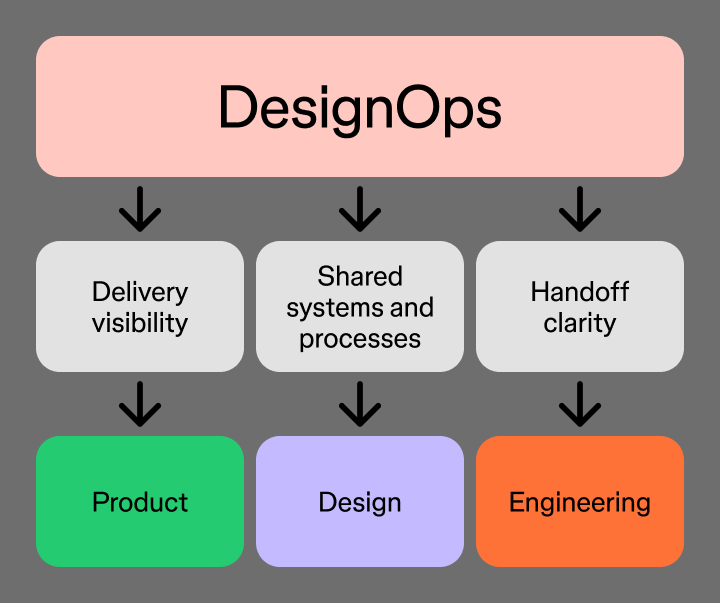
Figma Design gives teams one shared space to design, iterate, and maintain the systems that DesignOps depends on.
DesignOps teams work behind the scenes to keep design organizations running smoothly. Their responsibilities span process, people, and tools, but the through line is the same: reducing the friction that gets in the way of design collaboration.
Every design team has a workflow, whether it’s documented or not. DesignOps makes it intentional by mapping how work moves from a brief through developer handoff, then builds processes that hold up as the team grows.
Specific responsibilities include:
When these processes are in place, handoffs become cleaner, and design moves through the pipeline with less friction.
DesignOps is also about making sure team members have what they need to grow and contribute. That means thinking deliberately about how designers join the team and develop their skills.
Responsibilities in this area include:
On growing teams, critical knowledge usually lives in a handful of people’s heads. DesignOps builds the shared practices that keep everyone on the same page.
Design work can be hard to quantify. Part of DesignOps is building the measurement infrastructure that makes design’s impact visible to the rest of the organization.
A handful of meaningful KPIs goes further than a long list. Metrics like design system adoption rate and time-to-handoff give product and engineering leaders something concrete to point to.
DesignOps roles vary depending on the team’s size and maturity. At a startup, it might be a senior designer who owns the component library and documents the handoff process. At a larger organization, it could be a dedicated DesignOps lead supported by design program managers and a ResearchOps specialist.
Not every team needs a dedicated hire to see the benefits. Smaller teams can start by documenting their workflows and standardizing their tools, then build from there as the team grows.
The need for design operations usually shows up as a pattern of smaller frustrations that start to add up. If any of these feel familiar, it’s worth paying attention.
Addressing these problems early, before they compound, is DesignOps thinking in practice.
The platforms and systems a DesignOps team chooses shape how repeatable and scalable their workflows can become. Here’s a look at the main categories of tools:

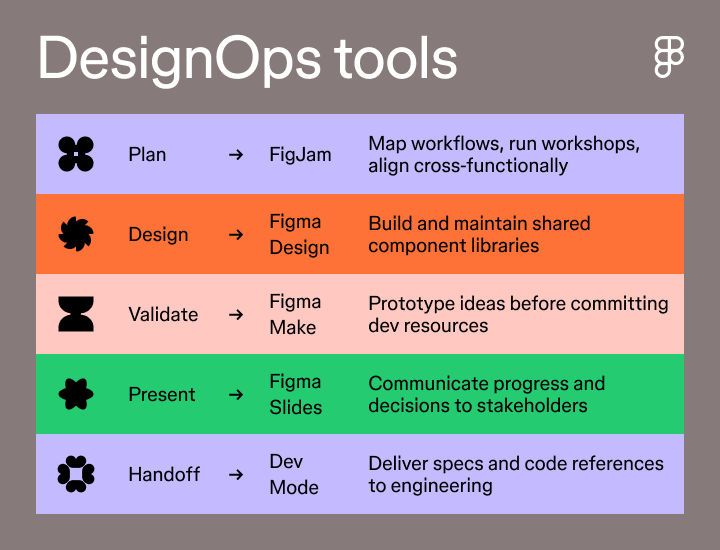
Plan, design, and hand off to engineering in one connected platform, so the transitions between stages don’t require a separate tool switch.
Not every team needs a dedicated DesignOps role. Smaller teams can start by documenting processes and standardizing tools before any dedicated hire is needed. A formal role makes the most sense when those responsibilities start taking significant time away from design work.
The most useful metrics connect design quality to delivery speed. Design system adoption rate, time from brief to handoff, and developer rework frequency are good starting points. Over time, designer satisfaction scores and onboarding ramp time can also signal whether the operational foundation is holding up.
A design system is a shared library of components, styles, and guidelines that keeps product work consistent. DesignOps is the practice that governs how the system gets built and adopted across the team. Think of the design system as the output and DesignOps as the infrastructure behind it.
Design operations is less about finding the perfect process and more about building the habits and systems that hold up as your team grows. The teams that do it well start small, document what works, and iterate from there.
Here’s how to put it together with Figma:
Figma Design gives your team one connected space to design, collaborate, and ship.
Avoid common design system scaling mistakes. Learn how to transition from a static library to a product infrastructure that aligns design and code at scale.


Explore 12 inspiring design system examples from top companies and the Figma Community. See how teams build consistency, scale, and collaborate effectively.


Product design and UX design both involve designing user-centric experiences. Learn about their differences, then use Figma's design tools to get started.


Explore 8 of the best design collaboration tools to help teams boost creativity, streamline workflows, and keep every project on track.


Explore 11 workflow design tools that help teams map, visualize, and move work forward.


Explore 18 of the best visual collaboration tools for design, whiteboarding, and teamwork.
Build faster with Figma's agent